

Most support teams start with a shared inbox. It works well enough when the volume of customer requests is small, but as the business grows, emails get missed, duplicate replies happen, and it’s hard to track who owns what.
A help desk solves these problems by turning scattered messages into organized tickets. With features for automation, collaboration, and reporting, it gives teams the structure they need to scale support effectively.
In this blog, we’ll explore the difference between a help desk and an inbox, why HubSpot Service Hub is a stronger option, and how it helps your team deliver faster, more reliable service.
What Is the Difference Between a Help Desk and an Inbox?

A shared inbox is the simplest way to manage customer requests. Messages come into one email address, and the team checks them as they arrive.
While this setup works for small teams, it lacks structure. It is easy for emails to get missed, for multiple people to reply at once, or for important customer context to disappear in long threads.
A help desk fixes this by turning every request into a ticket. Tickets have clear owners, due dates, and an easy way for the whole team to see progress. You can also add automation to route tickets and keep response times fast.
AI makes it even stronger. Customer service teams using AI have reduced call time by 45% and resolved issues 44% faster, demonstrating how a help desk can save time and lower costs compared to a traditional inbox.
Why Use a Help Desk Over Email?
Email works fine when you don’t have many customer requests. But as more people reach out, it gets messy. Messages pile up, no one knows who’s handling what, and some emails slip through the cracks.
A help desk solves this by turning every request into a ticket. Tickets are easy to assign, track, and close, so nothing gets lost. Your team can see who’s working on what, respond faster, and stay more organized.
Does HubSpot Have a Help Desk?
Yes, HubSpot Service Hub comes with a full help desk. It lets you turn emails, chats, forms, and even calls into tickets that are easy to track and manage. Each ticket lives inside the CRM, so your team can see the full customer history while they work on solving the issue.
You also get built-in tools for automation, reporting, and collaboration. That means faster response times, less manual work, and better insights into how your team is doing. A business needs this kind of visibility.
68% of C-level support executives say keeping customers is harder now than it was a year ago, and having the right tools makes all the difference.
With HubSpot, you’re not just answering emails. You’re giving your team a system that helps them stay organized, deliver consistent service, and keep customers coming back.
How Does HubSpot Service Hub Manage Tickets?

HubSpot Service Hub makes it easier to handle customer requests by turning them into tickets. A ticket tracks the full journey of an issue, from the first message to the final resolution, so nothing gets lost. Here’s how it works in practice:
1. Creating Tickets
Tickets can come from many different places: emails, live chat, forms, or even phone calls. HubSpot automatically captures these and logs them as tickets, so your team doesn’t have to move details around manually.
If a customer calls in about a billing issue, for instance, you can create a ticket right from the contact record so it’s linked to their history.
Doing this well means connecting your most common support channels to HubSpot. Email is usually the first step, but adding chat and forms helps make sure requests from your website or app don’t get missed. This creates a single source of truth, no matter how customers reach out.
2. Organizing Tickets
Once a ticket is created, it goes into a pipeline with stages like “New,” “In Progress,” and “Closed.” Pipelines make it easy to see the overall workload at a glance. Each ticket also shows customer details, notes, and past interactions, so reps always have context.
In HubSpot, you can customize these pipelines to fit your process. For example, a small team might use three stages, while a larger team could add extra stages like “Waiting on Customer” or “Escalated.”
You can also add tags and internal comments so everyone knows what has already been done. This way, tickets never get lost in long email chains.
3. Automating Workflows
Automation in Service Hub reduces repetitive tasks and keeps tickets moving forward. You can set rules so tickets are assigned based on skills, region, or issue type. If a ticket hasn’t been answered in 24 hours, HubSpot can send a reminder to the owner or escalate it to a manager.
Some useful automations include:
- Routing technical issues to the product team, while billing questions go to finance.
- Auto-replying to customers with links to your knowledge base while they wait for a human response.
- Closing tickets automatically when a customer hasn’t responded after a set number of days.
These workflows save time, reduce errors, and make sure your customers always get a response. It’s helpful to set them up thoughtfully. For instance, skill-based routing works best if you take the time to define each rep’s strengths in HubSpot first.
4. Reporting on Tickets
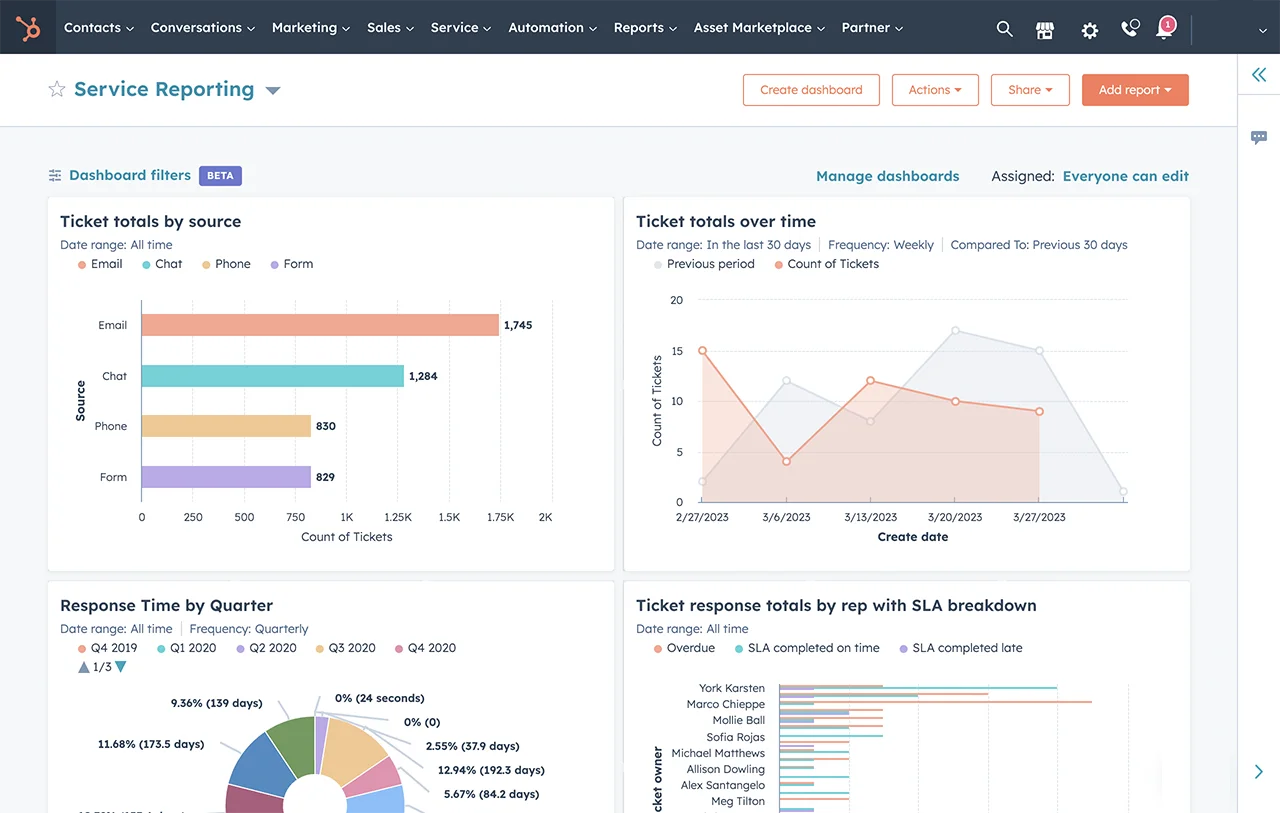
Service Hub gives you dashboards to track performance across your team. You can see average response times, ticket resolution times, and customer satisfaction scores in one place.
Over time, this data highlights patterns like which issues come up most often or when ticket volume spikes.
To make the most of reporting, it helps to create dashboards that match your team’s goals. A small support team might focus on keeping resolution times low, while a larger one may track SLA compliance across multiple channels.
You can even share dashboards with leadership so they see how customer service impacts retention and revenue. The more your team uses this data, the easier it becomes to spot problems early and keep service levels high.
Benefits of Choosing HubSpot’s Help Desk Over a Shared Inbox
Switching from a shared inbox to HubSpot’s help desk is more than just a software upgrade. It changes how your team handles requests, collaborates, and improves over time. Here are the key benefits and how to make the most of them:
1. Faster Response Times
Shared inboxes often slow teams down because messages pile up and no one knows who should answer first. HubSpot fixes this by letting you assign tickets and use automation to route them to the right person.
For example, you can set rules so billing questions always go to finance while product questions go to support. You can also set SLAs that trigger alerts if a ticket sits too long. This cuts down on delays and keeps customers from waiting too long for help.
2. Better Team Collaboration
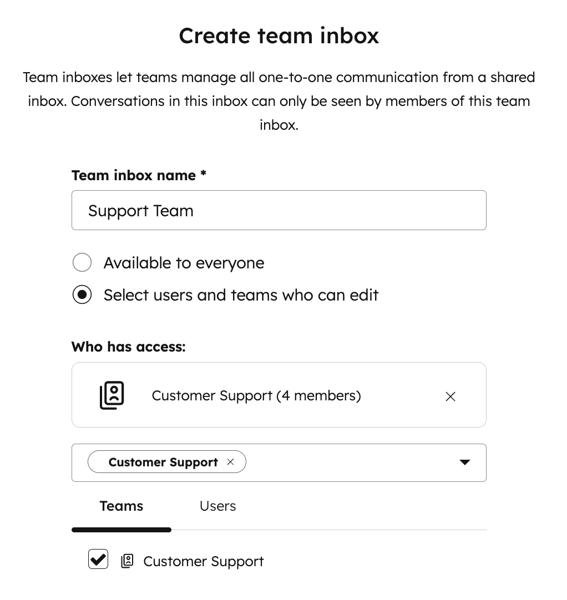
In a shared inbox, two people might answer the same customer without realizing it, or worse, no one replies at all. HubSpot solves this with notes, tags, and comments inside each ticket, so everyone knows what’s happening.
Some helpful ways to use this include:
- Adding internal notes to document what’s already been tried.
- Tagging teammates if another department needs to weigh in.
- Using ticket history to make sure customers don’t have to repeat themselves.
You can keep communication smooth inside your team and show customers a united front.
3. Data-Driven Insights
Shared inboxes don’t give you good data. You might know how many emails came in, but you can’t easily see trends or measure performance. HubSpot’s reporting changes that. It tracks things like response times, common issues, and overall customer satisfaction.
Teams can build dashboards that highlight the most important metrics. For example, if response time is slipping during peak hours, you’ll see it right away and can adjust staffing.
Over time, this data helps you spot recurring issues and fix them at the root instead of handling them one by one.
4. A Better Customer Experience
The biggest benefit is what customers see on their end. With a help desk, every interaction is tied to its full history in the CRM.
That means no more repeating details when they talk to different reps. Customers get faster, more accurate answers, and your team looks more professional. Customer expectations are higher than ever, and leaders know how tough it is to keep people loyal.
Since keeping customers is harder now than it was a year ago, it’s even more important to invest in better tools. HubSpot helps small teams deliver the kind of service that earns long-term trust.
From Inbox Chaos to Service Hub Clarity
Shared inboxes may work at the start, but they create confusion as customer requests grow. Messages get lost, response times slow down, and customers notice the cracks.
A help desk like HubSpot Service Hub brings order by giving your team structure, automation, and data to keep service running smoothly.
With tickets, automation, and reporting all connected to the CRM, Service Hub makes it easier for small teams to deliver service that feels fast, personal, and professional. The result is better efficiency for your team and a more reliable experience for your customers.
Work With Experts to Maximize HubSpot
Origin 63 helps teams move beyond shared inboxes and set up Service Hub the right way. We’ll tailor HubSpot’s tools so you can respond faster, work smarter, and scale support with confidence.
Talk to us today about upgrading your support system.











.png?width=90&height=90&name=Arrows%20Partner%20Badge-test%20(1).png)