
-3.png?width=450&height=450&name=Round%20Blog%20Thumbnail%20(8)-3.png)
HubSpot Service Hub is frequently evaluated alongside Salesforce and Zendesk, but these platforms are built on very operational focus.
Some are designed to handle extreme complexity from day one. Others prioritise speed, usability, and cross-team alignment. Making the right choice requires asking questions that go beyond surface-level comparisons.
This article is intended as a practical evaluation framework. It addresses common questions sales and marketing leaders have, helping to assess how HubSpot Service Hub performs in real-world operations and how it compares to other CRMs over time.
Everything You Should Know About HubSpot Service Hub

These questions turn high-level differences into practical steps. Your team can review them to make smarter decisions.
1. Can HubSpot Service Hub run service operation without heavy customization?
HubSpot Service Hub is designed to support day to day service work without requiring teams to rebuild core workflows before they can operate effectively.
Most support teams start with the same fundamentals. They need a shared inbox, structured ticketing, clear ownership, basic automation, and visibility into response times. These requirements are not unique, but the effort needed to implement them varies significantly depending on the platform.
With HubSpot Service Hub, these essentials are available out of the box. Ticket pipelines, shared inboxes, SLAs, and simple workflows can be enabled immediately and adjusted by service managers rather than technical specialists. This reduces reliance on administrators and allows teams to refine processes as they learn, instead of locking themselves into complex configurations early.
Other platforms approach this differently. Salesforce Service Cloud offers deep flexibility, but often assumes a higher level of initial configuration. Even standard service workflows may require custom objects, rule building, or external support. Zendesk enables fast ticket setup, but teams frequently find that expanding beyond basic handling requires additional tools or extensions.
2. How does Service Hub scale as ticket volume, channels, and team size increase?
HubSpot Service Hub is designed to scale through incremental growth rather than structural change. Teams can begin with simple workflows and introduce more advanced routing as volume and complexity increase.
Example of this is the automatic ticket assignment for chatflow channels that now considers the balance distribution of tickets and availability status of users.
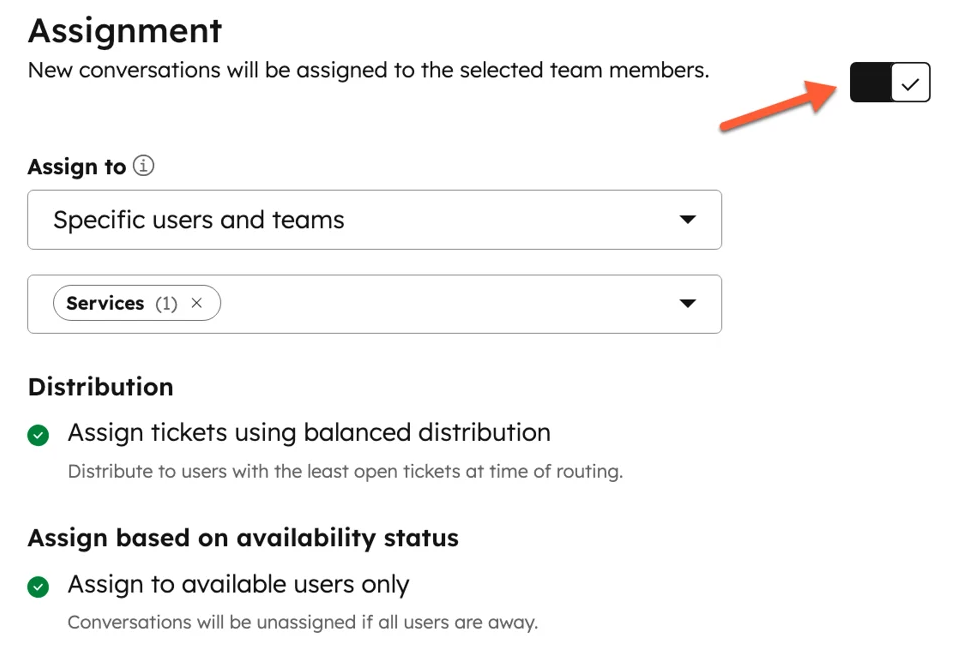
These capabilities are unlocked through plan tiers, not system redesigns, which allows organisations to grow without reworking their entire service operation.
The platform suits businesses expecting steady expansion. As ticket volume rises and new channels are added, teams can layer in automation and segmentation without disrupting familiar processes. Because Service Hub shares a data model with sales and marketing, growth across teams reinforces consistency instead of creating new silos.
Salesforce Service Cloud approaches scale differently. It is built to handle large scale complexity from the start, which can be valuable for enterprise environments. For many small to mid sized teams, however, this often results in managing advanced structures before they are truly needed, increasing overhead and administrative effort.
Zendesk performs well in high volume ticket environments, particularly for channel based support. Challenges tend to appear when service operations need tighter alignment with account ownership, renewals, or lifecycle reporting. At that point, teams may find that scaling service is easier than scaling context.
3. What will HubSpot Service Hub cost over time compared to other CRMs?
HubSpot Service Hub uses tiered pricing, with higher plans unlocking automation, reporting, and advanced support features.
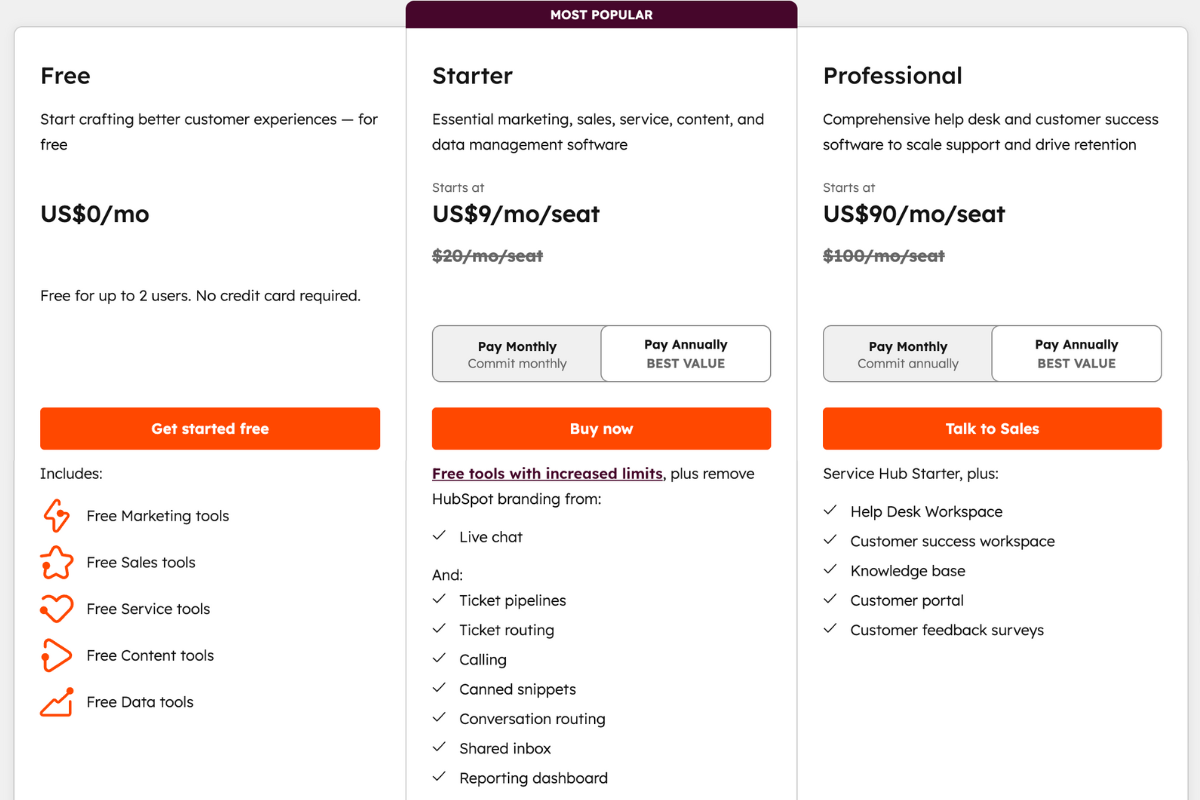
Many teams find it efficient when essential capabilities are bundled rather than sold separately. This creates a more predictable cost curve as usage expands.
Other platforms often rely on modular pricing. They require additional products for chat, analytics, or workflow enhancements. Or the costs can increase quickly once custom development, integrations, and external consultants are introduced. These expenses are not always visible during initial evaluation.
Time is also a cost. Platforms that require frequent administrative intervention, complex training, or ongoing maintenance place a hidden burden on teams. A tool that appears cheaper on paper can become more expensive when productivity loss and operational friction are considered.
The most sustainable CRM is not the cheapest option, but the one that remains manageable as the organisation grows.
4. How does Service Hub integrate with existing tools and customer data?
HubSpot Service Hub operates on the same CRM platform as HubSpot Sales and Marketing, which means customer records, communication history, and lifecycle data are shared by default.
Support agents have immediate visibility into what a customer has purchased, how they entered the funnel, recent marketing interactions, and who owns the account. This context is available without additional configuration or data syncing
Because this integration is native, data flows consistently across teams. Tickets, conversations, and account updates automatically reflect in the same customer record used by sales and marketing. This reduces the need for manual reconciliation, minimizes data discrepancies, and helps conversations feel continuous rather than fragmented.
Beyond native tools, Service Hub also integrates with a wide range of external applications. Teams can connect helpdesk tools, communication platforms, e-commerce systems, billing software, and internal tools through HubSpot’s App Marketplace or APIs.
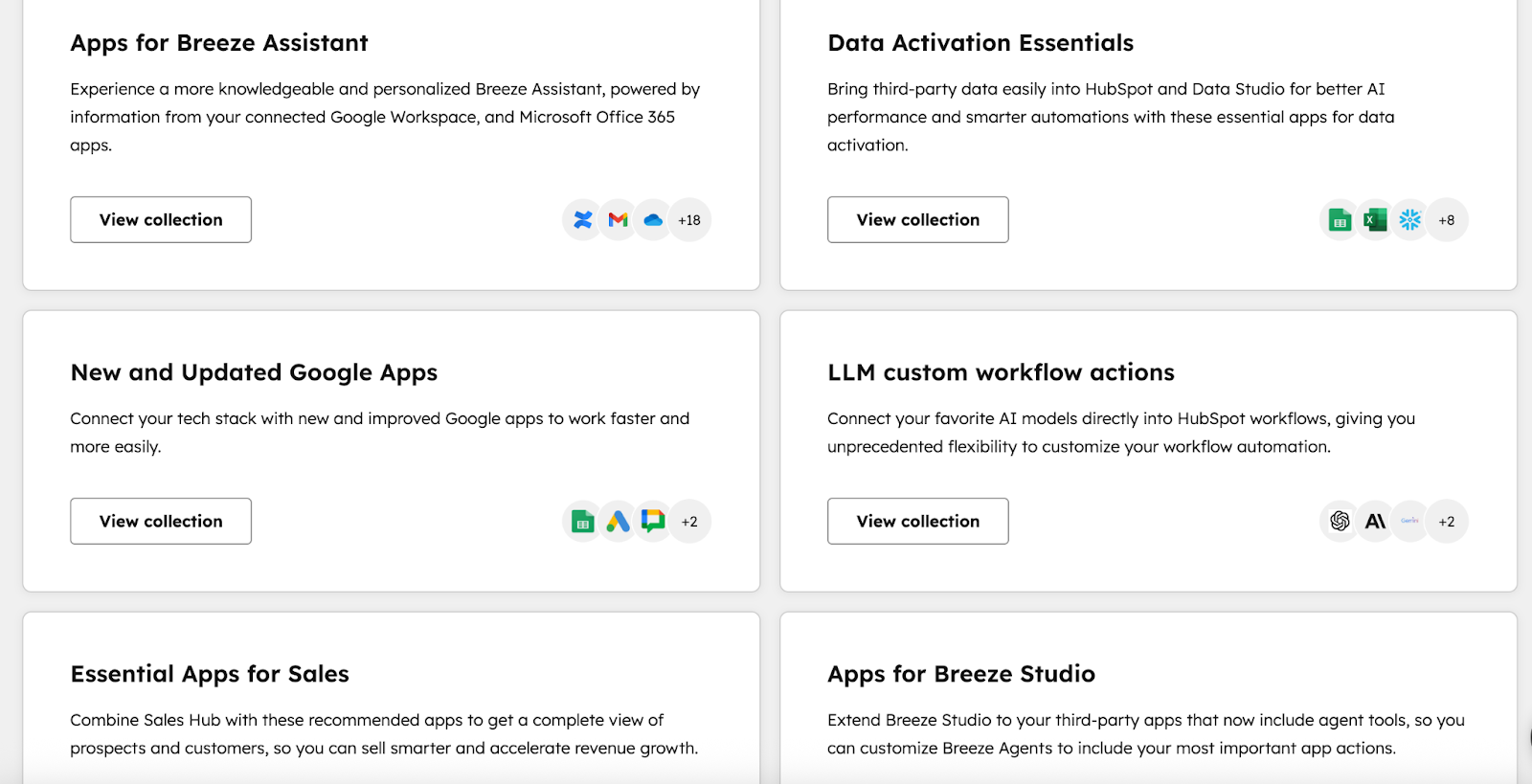
These integrations extend existing CRM records rather than creating parallel data sets, allowing external systems to contribute context without breaking the underlying customer view.
Other CRMs can reach similar outcomes, but often through more complex setups. They typically depends on integrations between separate clouds or custom-built connections to unify customer data.
5. How flexible is HubSpot’s reporting for service and business decision making?
Reporting is where many CRM platforms are tested. Collecting data is easy. Turning it into insights that influence decisions is harder.
HubSpot Service Hub includes built-in dashboards and reporting templates that cover the most common service metrics, including:
- Response times
- Resolution trends
- Ticket volume
- Backlog health
- Workload distribution
These reports are available out of the box and can be customised by non-technical users. Filters, date ranges, properties, and visualisations can be adjusted directly within the platform, eliminating the need to export data for basic analysis.
Because HubSpot uses a unified data model across service, sales, and marketing, service metrics can be analysed alongside deal activity, lifecycle stages, campaign engagement, and account ownership. This makes it possible to connect frontline service activity with broader business outcomes without complex data stitching.
Service managers can monitor SLA adherence and agent productivity, while revenue and operations leaders can assess how support interactions impact churn risk or upsell timing.
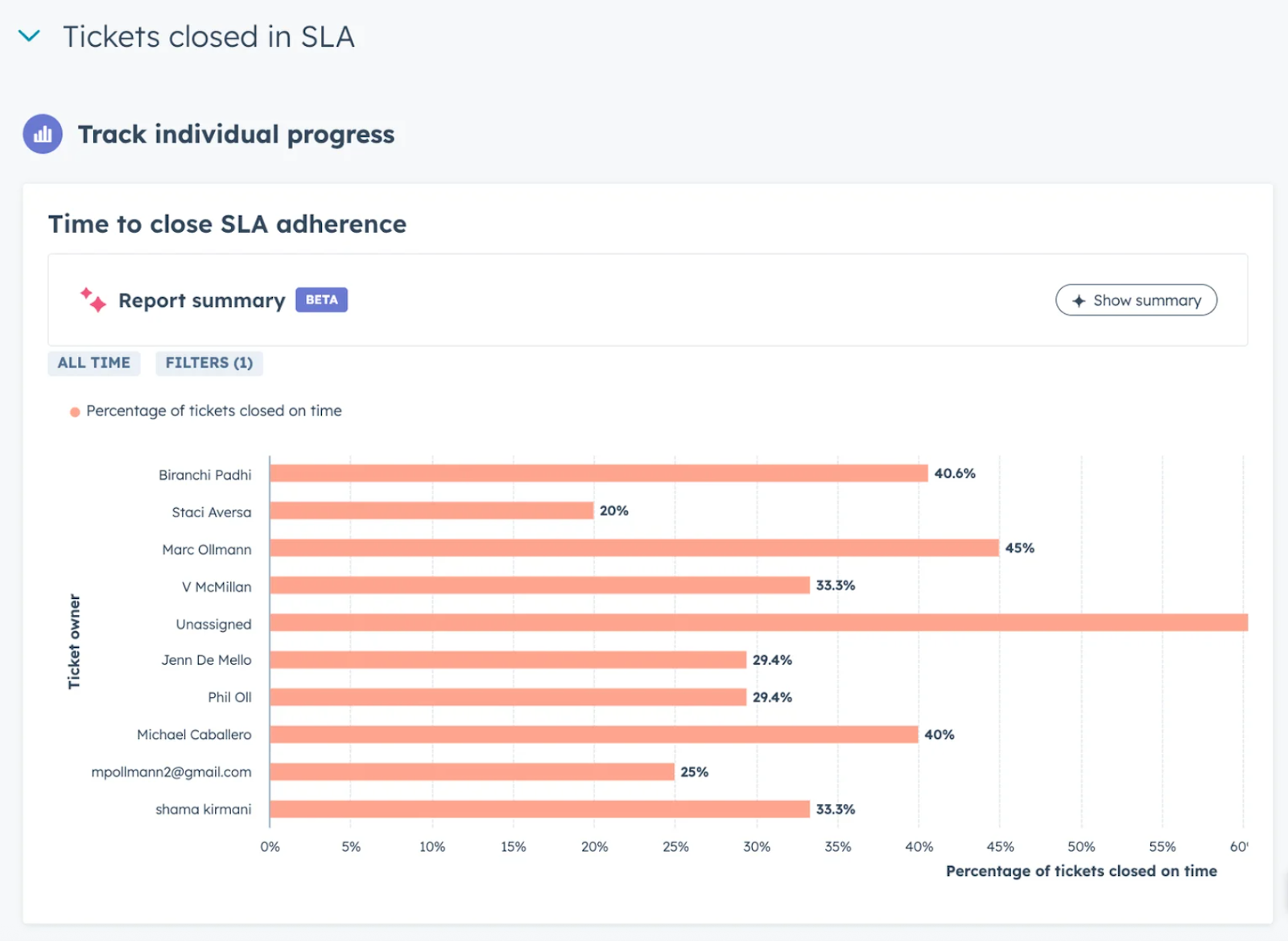
These insights are generated from the same underlying records, which improves consistency and confidence in reporting.
Some CRM platforms offer highly advanced reporting and analytics capabilities, but they often require specialist configuration, custom objects, or dedicated reporting teams to maintain. In practice, this limits how frequently reports are updated or how widely insights are shared across the organisation.
With its accessible design and fast performance, HubSpot Service Hub meets most teams’ service and business reporting needs without extra tools.
6. How can support teams adopt and use the platform every day?
Support teams adopt HubSpot Service Hub most effectively when it becomes the place where all customer conversations and tasks naturally happen. Day-to-day usage typically begins with agents working from a shared inbox and ticket pipelines that centralize email, chat, and other support channels.
Because tickets are created and updated in real time, agents spend most of their day inside the ticket view. From there, they can see conversation history, customer details, associated deals, and past interactions without leaving the workspace. All of these tasks can be handled right inside the same interface:
- Assigning ownership
- Updating ticket status
- Triggering internal notifications
- Applying simple automation
Consistent engagement with the platform is key. Just as top-performing salespeople spend about 18% more time updating their CRM to stay on top of deals, support teams benefit when they regularly update tickets and log interactions.
SLAs, routing rules, and prioritization can be added once teams are comfortable with the core workflow. Introducing clear expectations and measurable targets helps teams see their impact, similar to how 85% of marketers with SLAs report confidence in their strategy.
Service Hub supports daily use beyond ticket handling. Knowledge base articles help agents respond faster and maintain consistent answers. Feedback surveys collect customer sentiment after resolution. Reporting dashboards give managers visibility into workload and performance without requiring manual tracking.
These tools reinforce daily habits rather than adding separate systems, making adoption seamless and sustainable.
7. Does HubSpot Service Hub align with wider CRM and growth strategy?
Yes, HubSpot Service Hub aligns well with a wider CRM and growth strategy, especially when you’re aiming to unify marketing, sales, and customer service around a single source of truth for customer data and lifecycle management. Here’s how it fits strategically:
A. It’s Built on a Unified CRM Foundation
Service Hub runs on HubSpot’s central CRM platform, meaning every customer interaction, from first touch to support ticket, is tied to the same customer record.
This creates a 360° view of each customer, which is essential for strategic decision‑making, personalized engagement, and team alignment.
B. Strengthens Customer Retention and Growth
Traditional CRM systems concentrate on acquisition and sales pipelines. Service Hub extends that value into post‑purchase support, enabling you to retain more customers.
It treats support not just as a cost center, but as a growth opportunity by improving satisfaction, fostering loyalty, and generating referrals.
C. Breaks Down Data Silos Across Departments
Because Service Hub integrates seamlessly with Marketing Hub, Sales Hub, and Operations Hub, customer service data (like tickets, feedback, satisfaction scores) can be used across teams.
Sales can see open issues before renewing deals, marketing can tailor follow‑up campaigns based on service feedback, and support has full context on purchase history. This collaboration is strategic for consistent customer experiences and upsell opportunities.
D. Improves Metrics that Matter for Growth
Service Hub includes tools for customer feedback (CSAT, NPS), reporting dashboards, and automation workflows that help you track and optimize performance.
By measuring both support efficiency and customer sentiment, you get insights that feed continuous improvement.
E. Aligns with a “Customer First” Growth Model
HubSpot’s philosophy has shifted from a pure funnel model to a flywheel model, where customer experience fuels referrals and retention.
Service Hub plays directly into this model by ensuring support isn’t an afterthought but a strategic growth component.
HubSpot positions itself as the best CRM for businesses that want to turn every interaction into an opportunity for growth.
Confused About HubSpot Features? We’ve Got Answers!
HubSpot is designed to be intuitive and easy to use, making it simple for your team to manage customer service efficiently from day one. Whether you’re setting up ticket pipelines, automating workflows, or monitoring performance with built-in dashboards, HubSpot Service Hub provides the tools your team needs to deliver faster, smarter, and more consistent support.
We can help your team get the most out of HubSpot, ensuring your service operations run smoothly and your customers receive exceptional experiences every time.
Talk to Origin 63 today and see how HubSpot can make your service smarter, simpler, and more effective.










.png?width=90&height=90&name=Arrows%20Partner%20Badge-test%20(1).png)