
-3.png?width=450&height=450&name=Round%20Blog%20Thumbnail%20(9)-3.png)
When you work in customer support, every conversation depends on context. The more you know about the person on the other side of the screen, the easier it is to help them. Without that context, support becomes reactive.
This is where contact properties play a central role inside HubSpot Service Hub. They give customer agents a structured way to see who the customer is, what has happened before, and what matters right now. They also enable agents to keep records accurate without slowing conversations.
This article explains how customer agents use contact properties in Service Hub. You will see what properties are, how agents use them during real interactions, and how to create custom properties.
What Are Contact Properties in HubSpot

Contact properties are fields that store specific information about a contact in the HubSpot CRM. These properties help your team understand who the contact is, what they have done, and how they relate to your business. They are a core part of how HubSpot tracks and organizes customer data, enabling agents to act on it quickly and confidently.
HubSpot creates default contact properties in every account to store key information such as email address, phone number, and activity history. Some important default properties, such as lifecycle stage, are automatically populated by HubSpot based on your business's activity.
Contact properties extend beyond basic fields such as name and email. They can include things like:
- The last activity date shows when the contact was last engaged with a logged interaction.
- Last contacted, indicating the most recent time an agent reached out by email, call, or message.
- Create date, the date the contact was first added to your CRM.
- Lead status and lifecycle stage, helping your team understand where the contact is in a process or journey.
- Email properties like whether an email address is valid or opted out, and counts of delivered, opened, and clicked messages.
Some default properties cannot be edited because they are deeply embedded in how HubSpot analyzes and uses contact data. If you need to track something specific to your business, you can create custom contact properties instead.
Standard vs Custom Contact Properties
HubSpot includes an extensive set of standard contact properties that cover identity details, engagement data, and lifecycle markers. These provide baseline context without requiring setup.
Standard properties may include:
- First name and last name
- Email and phone number
- Lifecycle stage
- Last activity
- Lead status
- Record creation date
- Website and company information
- Marketing contact status
These fields help teams filter, segment, automate, and report on contacts across marketing, sales, and service.
Custom contact properties extend this further. They are fields you create to reflect data that matters to your business but is not included by default. For example:
- Customer tier or priority
- Onboarding progress
- Support escalation level
- Product usage category
Custom contact properties help you tailor HubSpot to your workflows and ensure agents always see the details that matter most.
How Customer Agents Use Contact Properties in HubSpot
Customer agents interact with contact properties constantly, often without thinking about it. They are embedded into the support workflow.
Viewing customer context during conversations
When an agent opens a ticket or replies in the inbox, contact properties appear alongside the conversation. The agent sees who the customer is, how long they have been active, and their current status.
This view changes how conversations start. Instead of asking for basic details, agents can jump straight into solving the issue. They know whether the customer is new or long-term. They know whether there are any open issues.
Using properties to guide responses
Contact properties do more than inform. They guide behavior. An agent may adjust tone based on customer tier. They may prioritize urgency based on lifecycle stage. They may offer different solutions based on past issues.
For example, a customer marked as onboarding may need more explanation. A long-term customer with repeated tickets may need reassurance and follow-up. Properties make these distinctions visible without extra effort.
This does not mean agents read from a script. It means they make better choices because the system surfaces what matters.
Updating properties during live interactions
Agents are not just viewers of data. They are contributors. During a conversation, an agent may learn new information. A role changes. A plan upgrade. An issue category becomes clear.
Service Hub allows agents to update contact properties during or after an interaction. This keeps records current. It also prevents the same questions from being asked again in the future.
How to Create Custom Properties in HubSpot Service Hub
1. Open your HubSpot Settings
Log in to your HubSpot account and click the settings icon in the top navigation bar. This opens your main settings panel, where you manage all account configuration.
2. Navigate to Properties
In the left sidebar menu, scroll down and select Properties. This section lists all fields (properties) used to store data on contacts, companies, deals, tickets, and more.
3. Select the Object Type
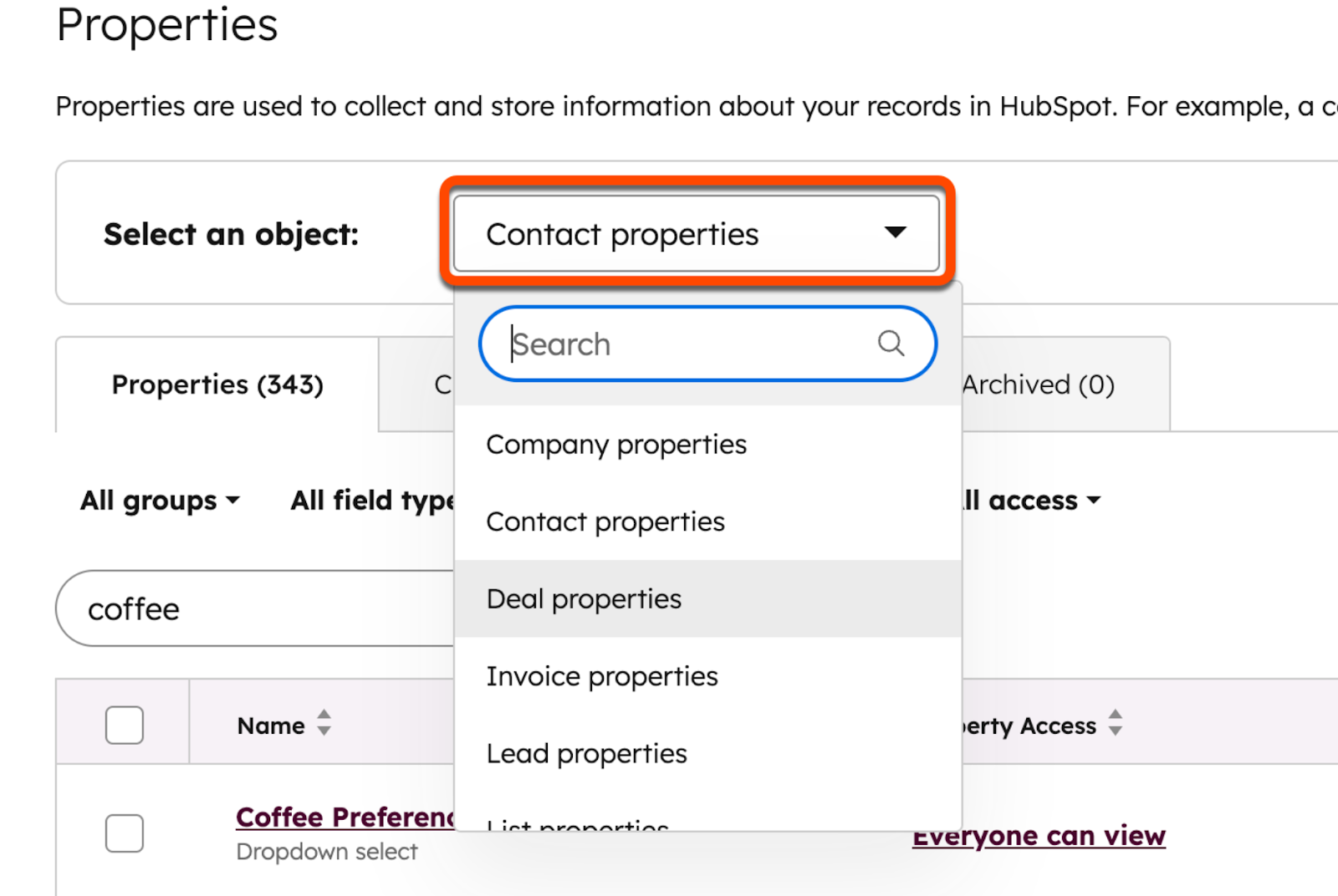
At the top of the Properties page, click the Select an object dropdown and choose Contact properties. This tells HubSpot that you want to create a property for contacts, not another object, such as companies or tickets.
4. Click “Create Property”
Above the table of existing properties, click the Create property button to start the property creation process.
5. Fill in Basic Property Details
In the property editor, you will see several fields to complete:
- Property label: Enter the name of the field as it will appear in HubSpot. For example, “Customer Tier” or “Support Priority.”
- Internal name: Automatically generated from the label, used behind the scenes for integrations and APIs. Once saved, this internal name cannot be changed.
- Group: Choose a property group that helps organize similar fields, such as “Contact Information” or “Service Data.”
- Description (optional): Add a short explanation of what this property tracks so other team members understand its purpose.
6. Choose the Field Type
Click the Field type dropdown to decide what kind of data this property will store. Common field types include:
- Single-line text for short text values
- Dropdown select for defined lists of options (e.g., Bronze, Silver, Gold)
- Number for numerical values like scores or counts
- Date picker for date fields such as renewal dates
- Checkboxes or radio buttons for multiple-choice or single-choice options
The field type determines how agents will interact with this property and how it can be used in automation.
7. Add Field Options (if applicable)
If you selected a field type such as dropdown, radio, or multiple checkboxes, you will need to define the options available to agents. Enter each option clearly and in the order that makes sense for your workflow.
8. Review and Create
Take a moment to review all settings. When everything looks correct, click Create to save the custom property. The new field becomes available immediately across contact records.
Why Contact Properties Matter for Personalized Service in HubSpot
Personalization is not about using a customer’s name. It is about responding in a way that makes sense given their history and needs. Contact properties make this possible at scale.
According to HubSpot research, 78% of customers expect more personalization in business interactions, making access to accurate customer context a priority for service teams.
Personalizing Conversations in Real Time
During a live conversation, agents rely on contact properties to shape their responses. They see past tickets, account details, and preferences that matter in the moment.
This helps agents avoid repetitive questions and unnecessary backtracking. It also allows them to acknowledge context naturally, without sounding scripted.
A simple reference to a previous issue or interaction can change how a customer feels about the conversation.
Aligning Support with Lifecycle Stage
Not all customers need the same type of support. New customers often need guidance. Established customers often want efficiency. At-risk customers need reassurance.
Lifecycle stage properties help agents identify where the customer is in their journey. This influences how much explanation to provide, how formal to be, and how proactive to act.
When lifecycle awareness becomes part of every conversation, support quality improves without adding time.
Creating Continuity Across Support Interactions
Customers rarely contact support just once. They return with follow-up questions or new issues. Contact properties create continuity across these interactions.
Because properties persist across tickets, agents can see what happened before. Customers do not need to re-explain their situation. This continuity builds trust and reduces frustration.
Over time, customers feel known. That feeling matters more than speed alone.
If you are looking for a clear, step-by-step approach to personalization at scale, this article is worth checking.
How Contact Properties Support Better Service at Scale

As support teams grow, complexity increases. More tickets. More agents. More handoffs. Contact properties help maintain quality even as volume rises.
Reducing Manual Work for Agents
Without structured contact properties, agents rely on notes and memory. That approach does not scale. Important context gets buried in long messages, internal comments, or handoff notes.
Contact properties reduce that manual work. Agents can see key details at a glance and update structured fields rather than writing paragraphs. This saves time and reduces fatigue across busy shifts.
Those efficiencies matter at scale. HubSpot reports that teams using its platform spend up to 39% less time closing tickets, reflecting how structured customer data reduces repetitive work and unnecessary back-and-forth.
Improving Consistency across the Support Team
Consistency matters for trust. Customers expect similar treatment regardless of who answers. Contact properties help standardize how agents interpret situations.
When properties define status and priority, decisions become clearer. Agents rely less on personal judgment alone. This does not remove flexibility. It provides a shared baseline.
Consistency also helps with training. New agents learn faster when properties guide their actions.
That makes scaling a service team feel manageable instead of chaotic.
Make Contact Properties Part of How Your Team Supports Customers!
Contact properties are not background data inside HubSpot Service Hub. They are active tools that shape how customer agents work every day. Agents rely on them to understand context, personalize conversations, and maintain accurate records.
If you want a clear, practical guide on how contact properties can support your specific business needs, we can help you map them to your service workflows and goals.
Talk to Origin 63 today and start improving how your team understands and manages every customer relationship.











.png?width=90&height=90&name=Arrows%20Partner%20Badge-test%20(1).png)