

Choosing the right customer service platform can make or break your support operations. Both HubSpot Service Hub and Zendesk are popular options, but they take very different approaches to help desk management, ticketing, and customer success.
In this blog, we'll break down the key differences between HubSpot Service Hub and Zendesk so you can decide which platform fits your team's needs.
You'll learn how they compare in terms of AI capabilities, omnichannel support, ticketing systems, integrations, and pricing.
Is HubSpot Service Hub Better Than Zendesk?

The answer depends on what your team needs most. HubSpot Service Hub is built on a unified CRM platform that connects marketing, sales, and service data in one place. This makes it easier to deliver personalized support and turn service interactions into growth opportunities.
Zendesk, on the other hand, focuses primarily on support and ticketing. It's a strong standalone help desk tool, but it doesn't natively connect to your sales and marketing data unless you add integrations or buy additional products.
If you want a platform that scales support while driving customer retention and revenue, HubSpot Service Hub is the better choice. If you only need basic ticketing without connecting to the rest of your business, Zendesk might work for smaller, simpler setups.
What Are the Main Differences Between Zendesk and HubSpot?
While both platforms offer help desk and ticketing features, the way they're built and what they prioritize are very different. Here's a breakdown of the key differences:
1. AI and Automation
HubSpot Service Hub uses Breeze, its collection of AI tools, to power smarter and faster support.
Breeze includes AI agents like the Customer Agent, which responds to customer inquiries 24/7 using your knowledge base, website, and CRM data. The Knowledge Base Agent automatically turns successful support conversations into self-service articles, reducing ticket volume over time.
Breeze Assistant acts as a personal AI companion that helps reps with meeting prep, content creation, and ticket summaries.
It understands your business context because it's connected to your CRM and ecosystem. This means faster responses, better customer experiences, and less manual work for your team.
Zendesk offers AI-powered chatbots and automation, but these tools are not as deeply integrated into the platform. Many Zendesk AI features require add-ons or third-party integrations, which can complicate your setup and increase costs.
Winner: HubSpot Service Hub's Breeze AI is more advanced, easier to use, and natively built into the platform. It helps teams scale support without adding headcount.
2. Omnichannel Support
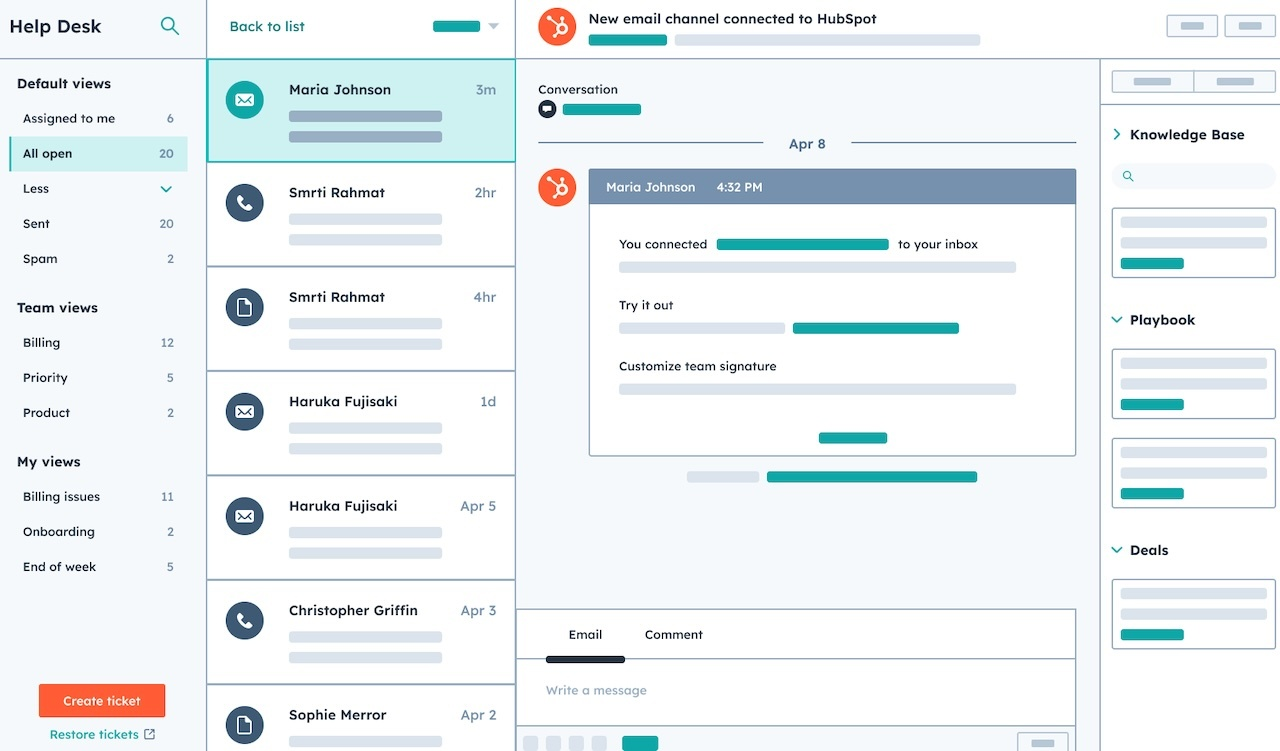
HubSpot Service Hub provides true omnichannel support by bringing email, live chat, phone, SMS, WhatsApp, Facebook Messenger, and more into one unified workspace.
Reps can switch between channels within the same ticket, so customers never have to repeat themselves. HubSpot also offers channel APIs, which let you integrate any messaging or voice platform your customers use.
Because Service Hub is built on the HubSpot CRM, every interaction is logged with full customer context. This means your team can see the entire customer journey, from marketing touchpoint to sales deal to support ticket, all in one place.
Zendesk also supports multiple channels, but the experience isn't as seamless. Conversations across channels often feel disconnected, and you may need additional tools or integrations to get a complete view of the customer.
Winner: It's a tie for basic omnichannel functionality, but HubSpot Service Hub takes the lead for teams that want seamless handoffs and full customer context across marketing, sales, and service.
3. Help Desk and Ticketing
HubSpot Service Hub turns every customer request into a trackable ticket. Tickets are organized in customizable pipelines with stages like "New," "In Progress," and "Closed." Reps can add internal notes, tags, and comments to collaborate on tickets without leaving the platform.
Automation makes ticketing even more efficient. You can set up rules to automatically assign tickets based on skills, region, or issue type. SLA tracking ensures tickets are resolved on time, and AI-generated reply recommendations help reps respond faster.
Service Hub also includes advanced features like conditional SLAs, intelligent routing, and IVR phone trees, which are available on higher-tier plans.
Zendesk is known for its robust ticketing system, which has been a core strength of the platform for years. It offers similar features to ticket routing, automation, and customizable workflows.
However, Zendesk's ticketing system is not connected to a native CRM, so you won't get the same level of customer context unless you integrate with a third-party CRM.
Winner: Zendesk has a strong ticketing system, but HubSpot Service Hub wins for teams that want ticketing integrated with a full CRM and seamless collaboration across departments.
4. Self-Service and Knowledge Management
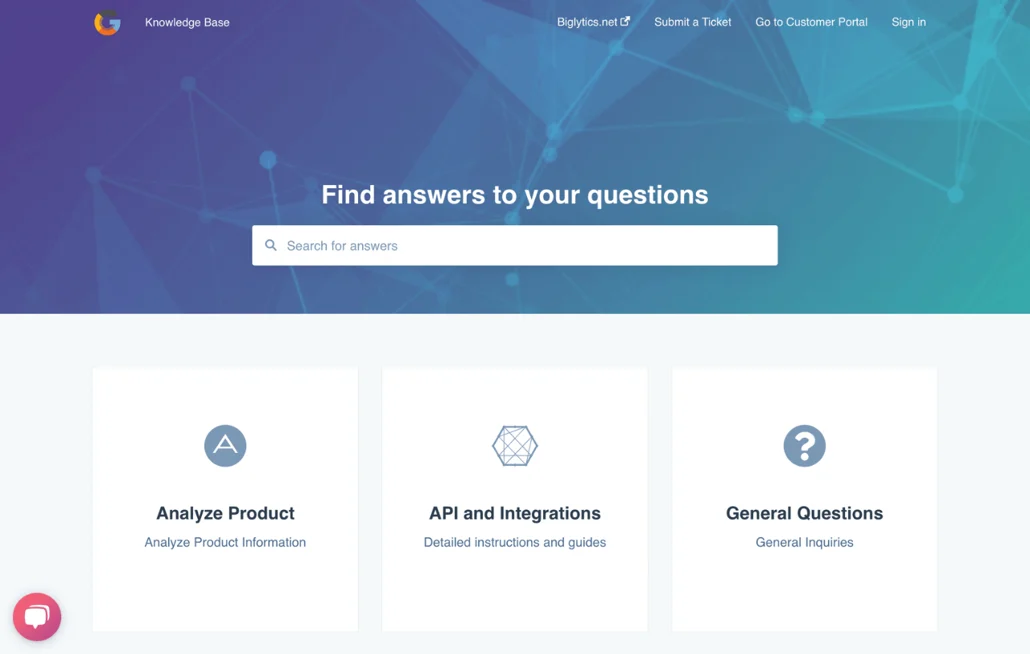
HubSpot Service Hub includes a powerful knowledge base tool that lets you create self-service articles for customers. Articles can be organized by topic, optimized for search engines, and published in multiple languages.
The Knowledge Base Agent (Beta) automatically converts successful support interactions into articles, so your knowledge base grows without manual effort.
HubSpot's knowledge base is fully customizable, so you can match it to your brand's look and feel. It also integrates with the help desk, so reps can easily share relevant articles with customers during support conversations.
Zendesk also offers a strong knowledge base with features like content cues, content blocks, and team publishing. Content cues help identify gaps in your knowledge base, which is a useful feature for keeping articles up to date.
Winner: Both platforms offer solid knowledge management tools, but HubSpot's AI-powered Knowledge Base Agent gives it an edge for teams that want to automate content creation and scale self-service.
5. Integrations
HubSpot Service Hub natively integrates with over 1,800 apps, including popular tools like Slack, Zoom, Gmail, Jira, and more. Because HubSpot is built on a unified customer platform, your service data automatically flows to marketing and sales without needing extra integrations. Developer-friendly APIs also let you build custom connections for any tool your team uses.
Zendesk offers over 1,500 third-party integrations through its marketplace. While this is a strong selection, many integrations require extra setup or paid add-ons. Zendesk also lacks a native CRM, so you'll need to integrate with tools like Salesforce or HubSpot to get a complete view of your customers.
Winner: HubSpot Service Hub wins for teams that want seamless integrations and a unified platform. Zendesk is a good option if you already have a CRM and just need help desk functionality.
6. Reporting and Analytics
HubSpot Service Hub provides built-in reporting dashboards that track key metrics like ticket volume, response times, resolution times, and customer satisfaction scores.
You can create custom reports to analyze performance across different channels, teams, or time periods. Because Service Hub is connected to the CRM, you can also track how service interactions impact customer lifetime value and revenue.
HubSpot's flexible dashboards let you combine multiple reports into high-level views for leadership or specific dashboards for individual team members. You can even share dashboards on Slack or email directly from HubSpot.
Zendesk offers customizable reports and dashboards, but setting them up can be complex and time-consuming. Some users have also noted that Zendesk's reporting tools feel outdated compared to newer platforms.
Winner: It's a tie for basic analytics, but HubSpot Service Hub wins for teams that want easy-to-use dashboards and reporting that connects service data to revenue insights.
Which Platform Is Better for Ticketing and Help Desk?

If you're looking for a standalone ticketing system with strong automation and workflow features, Zendesk is a solid choice. It's been built specifically for support teams and offers a mature, reliable ticketing platform.
However, if you want a ticketing system that's connected to a full CRM and can grow with your business, HubSpot Service Hub is the better option.
With Service Hub, your ticketing system becomes part of a larger customer platform that unites marketing, sales, and service data. This means better collaboration, more personalized support, and the ability to turn service interactions into growth opportunities.
Does HubSpot Replace Zendesk for Customer Support?
Yes, HubSpot Service Hub can fully replace Zendesk for customer support. In fact, many businesses migrate from Zendesk to HubSpot because they want a unified platform that connects service data to the rest of their business.
Here's what you get when you switch from Zendesk to HubSpot:
- A unified CRM that connects marketing, sales, and service data in one place
- AI-powered tools like Breeze Customer Agent and Breeze Assistant that scale support without adding headcount
- Omnichannel support that brings email, chat, phone, SMS, and more into a single workspace
- Seamless integrations with over 1,800 apps, plus developer-friendly APIs for custom connections
- Flexible pricing with a free plan and affordable paid tiers that scale with your business
If your team is frustrated by Zendesk's complexity, high costs, or disconnected data, HubSpot Service Hub is a strong alternative.
HubSpot Service Hub vs Zendesk: Pricing Plans
Pricing is an important factor when choosing a customer service platform. Let's compare the costs:
HubSpot Service Hub Pricing
HubSpot offers a free plan that includes basic ticketing, live chat, email, and a shared inbox for up to 5 users. This is a great way to get started without any upfront cost.
Paid plans start at:
- Starter: $20/month per seat (2-seat minimum)
- Professional: $100/month per seat (5-seat minimum)
- Enterprise: $150/month per seat (10-seat minimum)
All paid plans are billed annually. HubSpot also offers a 14-day free trial so you can test the platform before committing.
Zendesk Pricing
Zendesk does not offer a free plan, but it does provide a 14-day free trial. Paid plans start at:
- Support Team: $19/month per agent
- Suite Team: $55/month per agent
- Suite Growth: $89/month per agent
- Suite Professional & Enterprise: Contact sales for pricing
Zendesk requires a minimum of 5 agents for most plans, and all plans are billed annually.
Winner
HubSpot Service Hub wins for pricing flexibility. The free plan is generous and includes features that small teams need to get started.
For growing teams, HubSpot's paid plans offer more value because they include AI tools, CRM access, and seamless integrations without requiring expensive add-ons.
The Benefits of Choosing HubSpot Service Hub Over Zendesk
Switching to HubSpot Service Hub offers several key benefits that Zendesk can't match:
1. Unified Customer Platform
With HubSpot, your service data is connected to marketing and sales data on one platform. This means your team has full context for every customer interaction, which leads to faster resolutions and more personalized support.
In fact, with the rise of AI, 88% of customer experience specialists view personalization as critical for driving customer loyalty. HubSpot's unified platform makes it easy to deliver that personalization at scale.
2. AI That Actually Works
Breeze AI is built into every part of HubSpot, from ticket routing to reply recommendations to self-service automation. This means your team can scale support without adding headcount, which saves time and reduces costs.
3. Better Customer Experiences
Poor customer service is expensive. In fact, 43% of customers said that a poor customer service experience discouraged them from buying from a brand again. HubSpot Service Hub helps you avoid this by giving your team the tools they need to deliver fast, consistent, and helpful support.
4. Scalable and Affordable
HubSpot's pricing is transparent and scales with your business. You're not paying for add-ons or hidden fees. Plus, the free plan lets you start small and upgrade as your team grows.
From Zendesk to HubSpot: A Smarter Way Forward
Zendesk is a solid help desk tool, but it's not built to connect service data to the rest of your business. If you want a platform that unites marketing, sales, and service on one CRM, HubSpot Service Hub is the better choice.
With AI-powered tools, omnichannel support, seamless integrations, and flexible pricing, HubSpot Service Hub helps teams scale support, drive customer retention, and turn service into a growth engine.
And it's worth the investment. After all, 75% of customers will spend more on brands that offer good customer experiences. With HubSpot, you're not just solving problems — you're building loyalty and driving revenue.
Get Expert Help Migrating to HubSpot
Ready to make the switch from Zendesk to HubSpot? Origin 63 helps businesses migrate smoothly, set up Service Hub the right way, and train teams to use the platform effectively.
We'll guide you through data migration, workflow setup, and adoption so your team can deliver great service from day one. Talk to us today about upgrading your support system.







.png?width=90&height=90&name=Arrows%20Partner%20Badge-test%20(1).png)