
-Jan-19-2026-06-28-03-7773-PM.png?width=450&height=450&name=Round%20Blog%20Thumbnail%20(16)-Jan-19-2026-06-28-03-7773-PM.png)
The platform you use for customer service can make or break your workflow, and for small businesses, every choice counts. You need a system that keeps customers happy while staying within budget.
That’s why many small businesses turn to a good CRM. About 91% of organizations with ten or more employees use a CRM to manage customer data. It’s clear that organized customer management is key to running an efficient business. A CRM streamlines support processes, keeps conversations organized, and provides insights to improve customer satisfaction.
In this article, we look at why small businesses need a customer relationship management system. Then we walk through the best CRM in the market, such as HubSpot, Salesforce, Zendesk, Zoho, and Freshdesk. We finish with a clear recommendation for your team to decide.
Why the Right Service CRM Matters for Small Businesses

Small teams often have to accomplish more with fewer resources, making it essential to choose a CRM that works for you instead of adding complexity. The right service CRM keeps every customer interaction in one place, simplifies workflows, automates repetitive tasks, and provides actionable insights, helping your team focus on high-value work.
In fact, 78% of sales leaders say their CRM improves collaboration between sales and marketing, showing how a single platform can streamline communication and boost overall efficiency.
A strong service CRM supports all of these needs:
- Ease of use. Interfaces should be intuitive, with workflows that are easy to build, update, and manage.
- Automation that saves time. Features like auto ticket routing, canned replies, and simple chatbots allow small teams to serve more customers efficiently.
- Omnichannel support and shared inboxes. Customers contact you on multiple channels, and your team needs the full conversation in one place.
- Simple, actionable reporting. Metrics like response time, ticket volume, and CSAT should be easy to access and interpret.
- Integrations. A CRM should connect seamlessly to email, chat, phones, and other tools you already use, reducing setup time.
- Scalability. The platform should grow with your team, allowing you to start small and gradually enable more advanced features as needed.
For small businesses, the best CRM is one that is affordable, simple to use, and flexible enough to grow alongside your team while keeping customer interactions organized and actionable.
How HubSpot Service Hub Helps Small Businesses
HubSpot Service Hub sits inside HubSpot’s unified platform. It ties customer service to the company-wide CRM, so every ticket links to the same contact record. They offer a free plan and several paid tiers that scale from starter to enterprise.
The service tools in HubSpot are designed to support and improve customer experience, including:
- Shared inboxes – Consolidate emails, chat messages, and social media interactions so your team can manage all conversations in one place.
- Ticket pipelines – Track, prioritize, and resolve customer issues efficiently.
- Live chat – Provide real-time support for customers visiting your website.
- Knowledge base – Create self-service articles and FAQs, empowering customers to find answers on their own and reducing repetitive questions.
- Automated routing and follow-up – Ensure tickets are sent to the right team members and that no customer request is overlooked.
HubSpot is known for being easy to learn and for the way it unites marketing, sales, and service data in one place.
Because of that, small businesses that want a single system for go-to-market activities often start with HubSpot.
HubSpot Service Hub vs Salesforce
Salesforce delivers deep functionality across sales and service, enabling teams to create highly tailored processes. For organizations that need complex automations or advanced customization, Salesforce can be a strong fit.
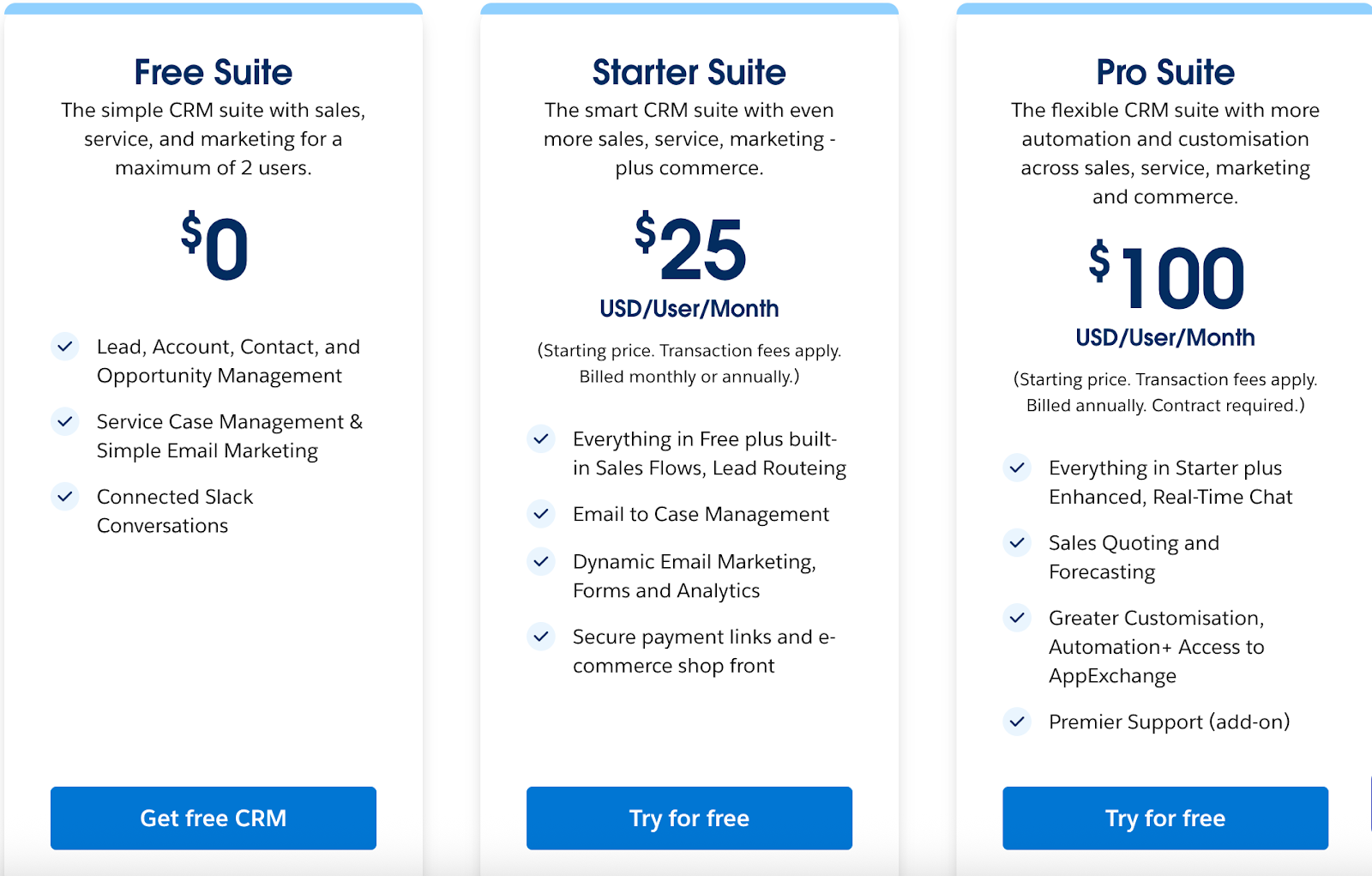
Salesforce offers a free suite and starter pricing for its small-business tiers. The entry-level plans can be expanded with add-ons. This gives businesses a path to unlock more advanced features as they grow.
On the other hand, HubSpot Service Hub is built to get small teams up and running quickly. The interface is easy to learn, and the tools for tickets, customer communication, and reporting work right away with minimal configuration. They also offer a free tier plan that gives you access to foundational tools.
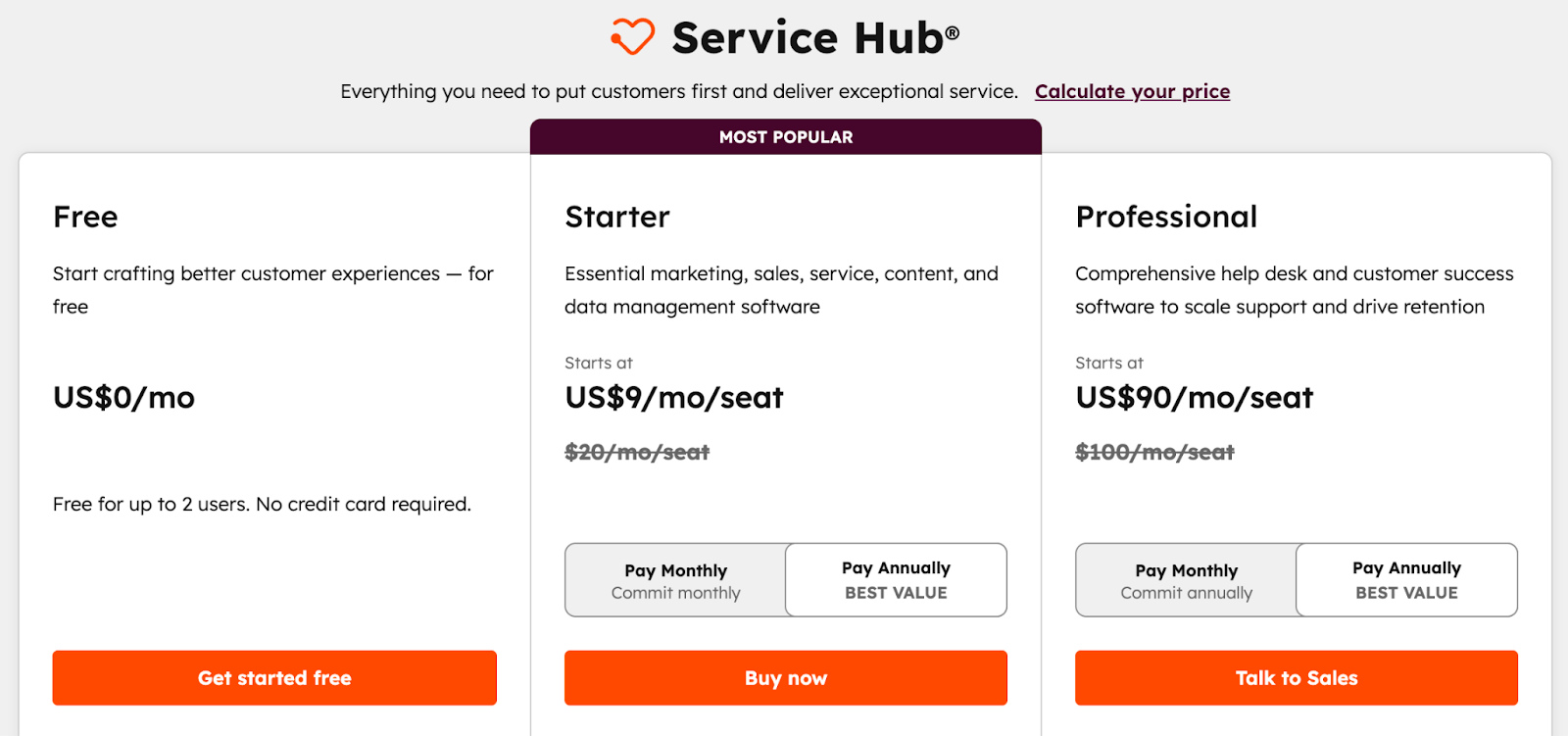
Free for up to 2 users, and no credit card required. The platform also offers the best starter plan, with modest per-seat pricing. HubSpot is very attractive for teams that want to start with no upfront cost.
Salesforce can be the right choice for teams that want extensive customization and are ready to invest time and budget into building a highly tailored system. HubSpot often appeals to teams that wish for fast time-to-value, a predictable setup, and a platform that remains easy to maintain as they grow.
HubSpot Service Hub vs Zendesk
Zendesk began as a help desk platform. Its core strengths include ticket management, omnichannel messaging, and self-service. Zendesk offers a ticketing engine, detailed routing rules, and escalation workflows that larger service teams rely on.
It also provides advanced capabilities such as AI agents, workforce management, and analytics designed for high-volume environments. For teams that run a heavy support operation and need a best-in-class help desk, Zendesk can be a strong fit.
Small teams often appreciate HubSpot Service Hub because customer data, conversations, and history are all in one place without additional connectors.
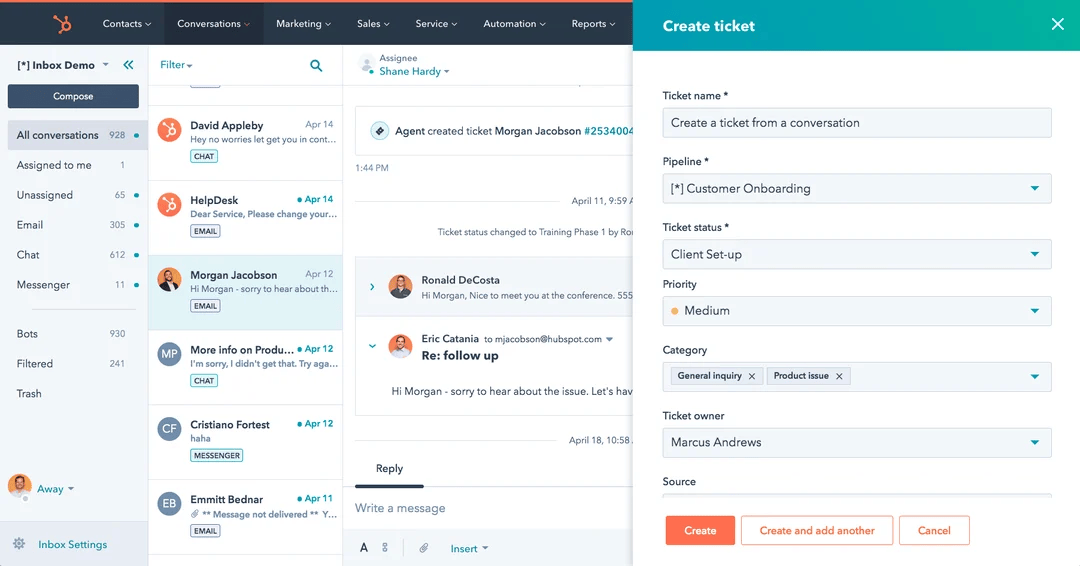
HubSpot’s ticketing, shared inbox, and automation features are easy to get started with and flexible enough to grow into. Businesses that want to blend support with sales handoffs, lifecycle reporting, or customer success workflows can do so without switching platforms.
Zendesk stands out for its robust service features and support for scaling operations. HubSpot often appeals to teams that want strong service tools plus an easy link to the rest of the customer journey.
The best choice depends on whether your priority is a specialized help desk or a connected CRM that supports the full customer lifecycle.
HubSpot Service Hub vs Zoho CRM
Zoho CRM includes sales and service capabilities, offering automation, lead scoring, and an AI assistant called Zia on higher-tier plans.
Small teams often find it easier to get started with HubSpot because the interface is intuitive and workflows are pre-configured for common scenarios. HubSpot also provides automation, ticketing, reporting, and a shared inbox, while still allowing customization as the business grows.
While Zoho offers breadth and budget-friendly scaling, HubSpot tends to appeal to teams that prioritize seamless integration across customer-facing teams, and a CRM that grows with them without adding unnecessary complexity.
There’s a separate article that compares these tools in detail. You can check it out here.
HubSpot Service Hub vs Freshdesk
Freshdesk is built primarily as a help desk platform for customer support teams. It is part of the Freshworks suite and is designed for quick setup and ease of use. Freshdesk offers core features such as ticketing, a knowledge base, automation, and reporting.
Its free plan for a small number of agents can be appealing for teams that want to test a support tool quickly without commitment.
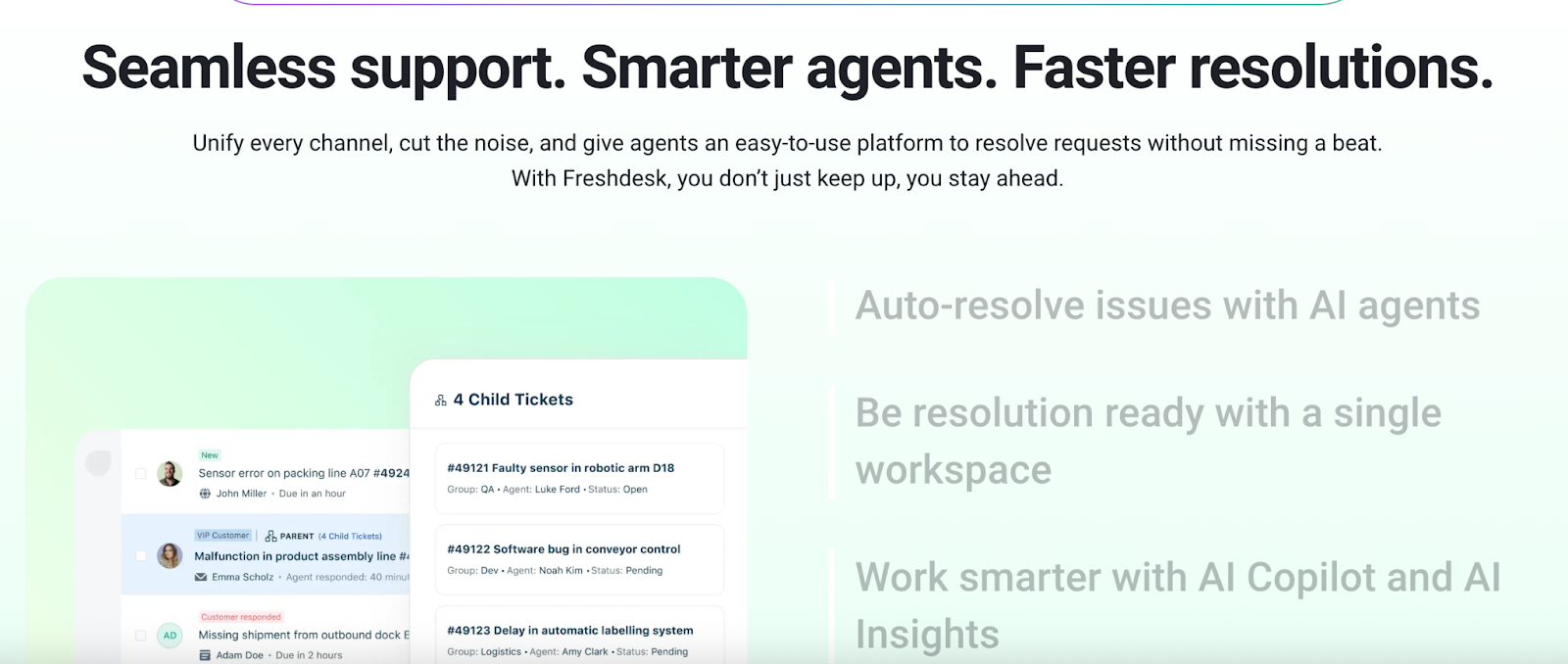
Freshdesk works well for teams that need a lightweight support solution with minimal setup. It focuses heavily on ticket management and basic service workflows.
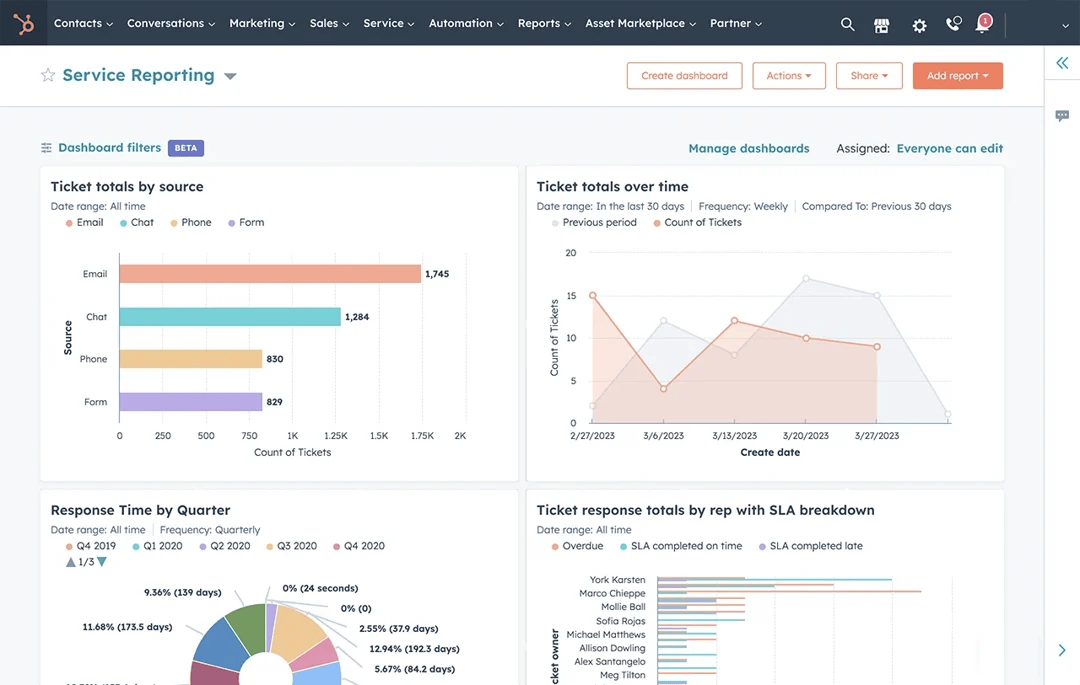
HubSpot Service Hub provides flexible features that go beyond basic ticketing. HubSpot includes automation for routing, follow-ups, and SLA tracking, but also offers reporting, as shown below, that links service outcomes, customer lifecycle stage, and team performance.
In addition, HubSpot offers workflow and automation capabilities that help teams create recurring processes, trigger notifications, and escalate issues, all while scaling with minimal overhead.
For small teams that want a help desk experience with more built-in functionality and long-term flexibility, HubSpot offers a balance of simplicity and expandability. It provides the essentials of a support platform without requiring the purchase of multiple products or relying heavily on integrations.
Freshdesk is a solid choice for teams that want a lightweight, standalone help desk, especially if they plan to stay focused on support. HubSpot appeals to teams that want to combine service efficiency with broader operational insights and automation that can grow with the business.
So, Which CRM Truly Fits a Small Business?
The honest answer is that the best CRM depends on which problem you need to solve first. Mostly depends on the cost, entry-level fit, day-to-day usability for the team, and the ability to scale without a painful migration.
Cost and Entry-level Fit
For strictly free or near-free options, HubSpot, Salesforce, and Zoho will usually be the easiest to adopt. HubSpot stands out when you want CRM plus service in one place and a truly usable free CRM.
The other CRMs offer limited free programs for small agent counts and require more configuration, resulting in a higher initial cost.
Day-to-day Usability
If the team will be small and possibly non-technical, you want a tool that is quick to learn. HubSpot and Freshdesk are the easiest for everyday users. HubSpot provides a clean, single view of contacts and tickets, plus built-in chat and a knowledge base.
Freshdesk is simple for support agents who just need ticketing and a knowledge base. If you value speed of adoption and minimal training, prioritize HubSpot or Freshdesk.
Scalability and Avoiding Future Migration Issues
For businesses that expect rapid growth in customers and complexity, consider two perspectives.
First, will the tool let you add features in the same ecosystem as you grow?
Second, will the cost model remain predictable?
Most of the CRMs mentioned have plans designed to scale into enterprise needs. But if you want long-term scaling without losing historical data, HubSpot and Salesforce provide the most cohesive paths.
In Short
- If your small business needs a single system that unites service, marketing, sales, and support, and you want fast adoption, then HubSpot is the best starting place.
- If your business is support-centered and you need better ticketing and workforce tools, choose either Zendesk or HubSpot.
- If you want budget-friendly breadth across business functions, pick HubSpot, Salesforce, or Zoho
It is best to reach out to each platform directly to explore its features, ask questions about specific advantages, or start a free demo to see firsthand if it meets your team’s needs and workflow.
3 Scenarios Showing HubSpot in Action
These scenarios show how HubSpot helps different teams simplify their customer operations.
Scenario 1: One System for Your Whole Customer Journey
A small team of fewer than 10 people can use HubSpot as their primary workspace for customer management, tickets, and marketing. Instead of switching between email, spreadsheets, and support software, everything sits inside a shared CRM.
Example: A customer submits a question through your website chat. HubSpot automatically creates a ticket, assigns it to the right team member, and saves the entire chat history inside the customer’s profile. When that same customer later fills out a form or replies to a campaign email, the activity is added to the same record, eliminating the need for manual tracking.
This setup works well for teams that want a simple, fast system they can manage without technical help.
Scenario 2: Scaling Support for Growing Teams

When your support workload grows, and you start handling multiple channels (chat, email, phone, and social), HubSpot keeps everything organized and manageable. The support team can manage all channels from a single place using routing rules and ticket automation.
Example: A team receiving 200+ daily messages sets up rules so billing questions from email go straight to the finance queue, while product issues from chat go to technical support. Over time, they build a knowledge base that automatically answers common questions, reducing the need for repetitive tickets.
Dashboards show SLA status, backlog changes, and response times, helping teams keep structure as volume increases.
Scenario 3: All-in-One Functionality at Low Cost
HubSpot gives teams a single platform to manage sales, marketing, and customer service, helping them avoid paying for multiple separate tools.
Example: A business connects its billing app from the HubSpot Marketplace. When a payment is made, the customer’s profile is automatically updated, and the sales team is notified. Marketing can then send renewal reminders, while support sees the customer’s full billing and communication history without leaving HubSpot.
This approach suits teams that want a complete system, predictable pricing, and a platform they can expand over time without rebuilding their processes.
Want more scenarios? These case studies show why HubSpot works so well for businesses of all types.
The CRM Small Businesses Can Rely On
HubSpot Service Hub is an excellent starting point for teams that want a CRM-first approach with seamless customer service built in.
Its strength lies in giving teams a clear view of every customer interaction, streamlining workflows, and enabling automation without adding unnecessary complexity.
If you want a clear explanation of how HubSpot can specifically support your business, we can help you choose the tools that make the most impact.
Talk to Origin 63 today and start improving how your team understands and manages every customer relationship.







.png?width=90&height=90&name=Arrows%20Partner%20Badge-test%20(1).png)