
-1.png?width=450&height=450&name=Round%20Blog%20Thumbnail%20(4)-1.png)

Support teams now handle more channels and conversations, and leadership teams want to know which system will provide structure without slowing them down.
When companies look for a customer service platform that connects all these moving pieces, two names show up almost every time. HubSpot Service Hub and Zoho CRM. Both handle tickets, cases, and automation, but they serve teams differently.
This article explores those differences in depth so teams can choose the tool that best supports how they actually work.
HubSpot Service Hub Overview
HubSpot Service Hub runs inside a unified CRM that also powers its marketing and sales tools. The benefit is straightforward: everything lives in one place. This connected structure is one reason 87% of marketers using HubSpot say their marketing strategies became more effective.
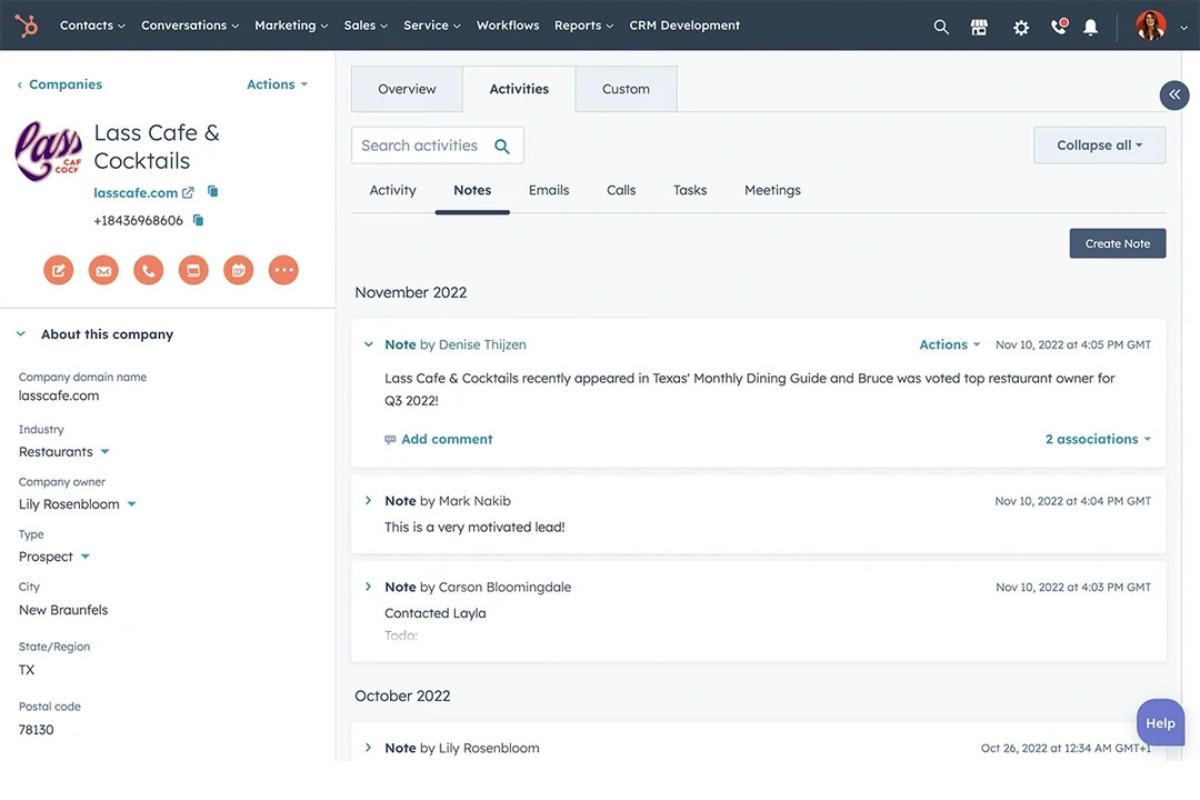
With the service hub, a support agent can open a contact record and see emails, past conversations, chat transcripts, notes, marketing interactions, and deal activity. A sales rep can see open tickets before renewal conversations. A marketing manager can see service issues that may affect customer satisfaction.
The information never feels scattered across separate apps because the entire customer record lives in a single system.
Ease of use is one of HubSpot’s strongest qualities. Support teams do not have to manage technical setup or configure heavy processes before they can be productive. Ticket pipelines are simple to build. Shared inboxes are easy to use. Automation rules work with clear triggers and actions.
HubSpot works best for teams that want a clean experience with enough customization while keeping everything simple.
Zoho CRM Overview
Zoho CRM emphasizes custom workflows and detailed control. Their structure allows teams to tailor almost every part of the platform. If HubSpot aims for clarity and user friendliness, Zoho focuses on flexibility and precision.
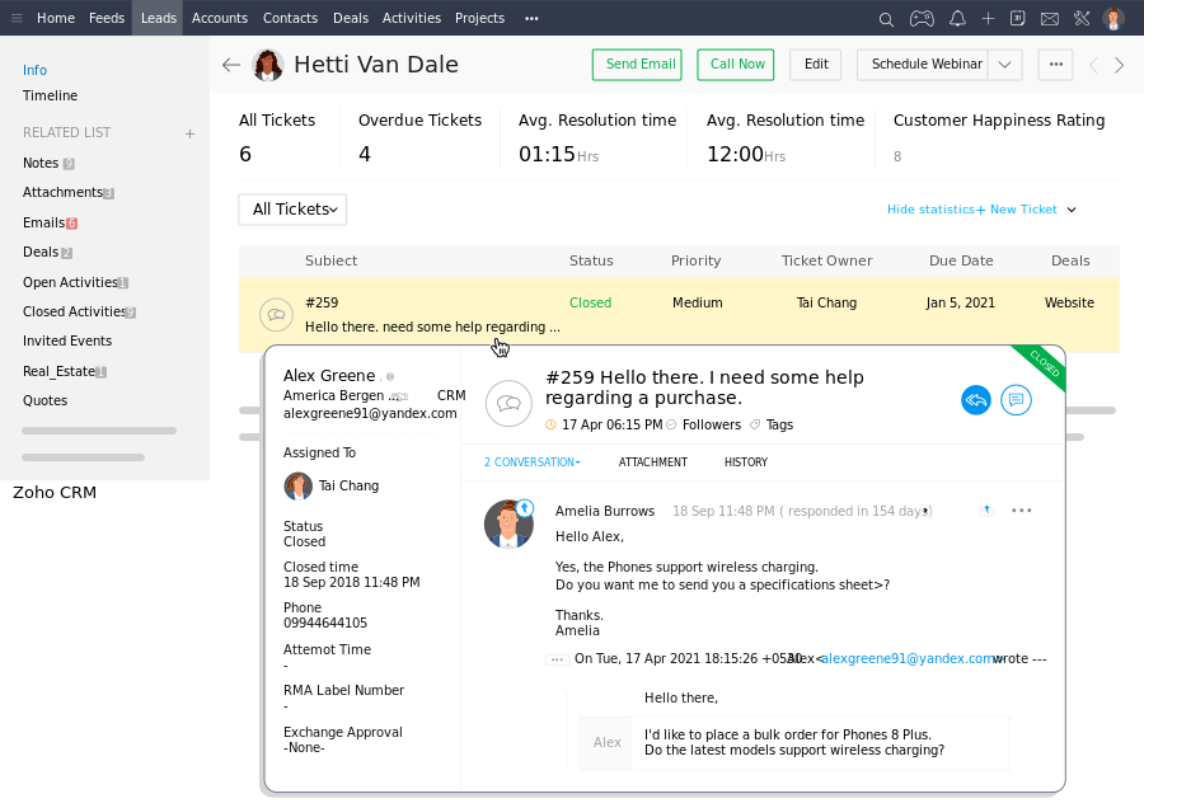
Zoho CRM supports service operations through case tracking, automation, portals, and Zia AI insights. The system integrates seamlessly with other Zoho tools, such as Zoho Desk and Zoho SalesIQ.
Zia, Zoho’s AI assistant, can identify anomalies, make predictions, interpret customer messages, and suggest actions. Teams that rely on high automation or advanced forecasting often find Zia useful.
The platform also includes Blueprint, a tool that enables companies to define specific process steps agents must follow. This is valuable for industries with compliance requirements or strict service procedures. Portals for customers, vendors, and partners provide external users with a direct channel to submit information without agent intervention.
Zoho CRM suits teams that want a system that aligns with their internal processes.
Feature by Feature Comparison
1. Ticketing, Cases, and Support Management
HubSpot Service Hub uses a ticket pipeline that moves through stages. These stages match the support process and can be adjusted for each team. The Conversations Inbox consolidates emails, chat conversations, and form submissions into a single view.
Tickets integrate with chat tools and chatbot flows, keeping the experience cohesive. SLAs, escalations, and automation rules help service teams manage volume and prioritize work.
While Zoho CRM uses cases to link to customer records, it can be tracked across email, phone, chat, and social channels. Zoho Desk expands these tools with deeper support-focused features. Blueprint helps teams design structured steps that agents must complete before moving to the next part of the workflow. Portals let customers track progress without waiting for updates.
2. Automation and AI
HubSpot provides service teams with powerful automation that eliminates repetitive work. Workflows can assign tickets, route conversations to the right team, create follow-up tasks, and trigger reminders when something needs attention.
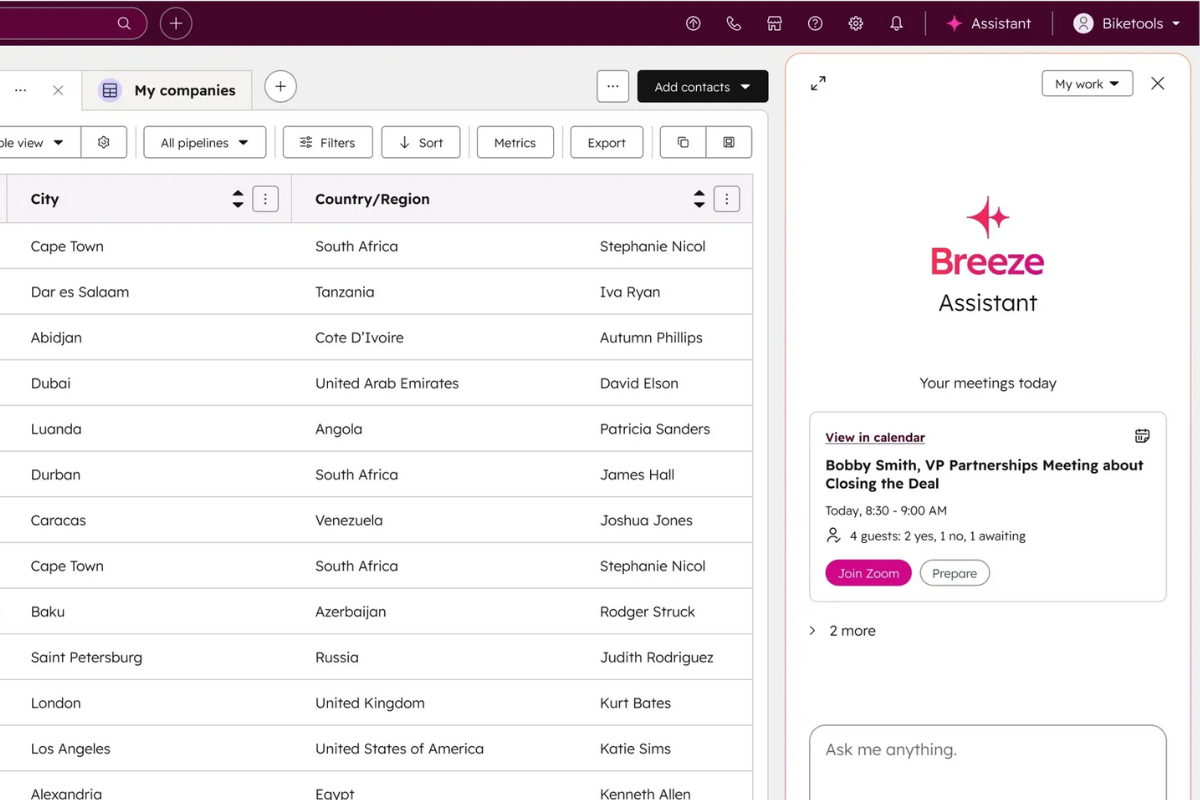
HubSpot also includes AI features powered by Breeze AI. Agents can get conversation summaries that highlight the most important details, so they do not need to review long chats or emails. Breeze AI can rewrite messages to make replies clearer and more helpful. It can also suggest responses based on the customer’s tone and the conversation's context. Read more about HubSpot’s self-learning CRM.
Zoho CRM also offers automation options. Zia can detect unusual behavior, predict customer actions, and assist with follow-ups. Journey orchestration helps map paths spanning multiple steps across different channels.
The platform also offers guided processes in Kiosk Studio so teams can enforce consistent behavior across agents.
3. Contact, Customer Management, and Multi-Channel Support
In HubSpot, every customer interaction is recorded in a single record, giving support teams a complete timeline of actions. They also offer customizable properties and segmentation tools that let teams group contacts by behavior or profile.
Their scoring features help identify customers who need attention or may be at risk. Because every department uses the same CRM, support teams have the context they need to respond with confidence.
Zoho CRM offers greater control for companies that want to tailor their system to their internal structures. Teams can build detailed layouts, create custom fields, apply conditional rules, and design territories that align with their organization's structure.
Zoho’s lead and customer management tools also support enrichment, so teams always work with updated information. This structure suits businesses with very specific workflows or complex approval processes.
Both HubSpot and Zoho support communication across email, phone, chat, and social channels. HubSpot’s platform also enables companies to manage customer interactions seamlessly, including cases such as product warranties and service requests, giving agents full context in one place. See how HubSpot CRM supports warranty management.
4. Reporting and Analytics
HubSpot provides a clean reporting environment that works well for teams that want quick visibility.
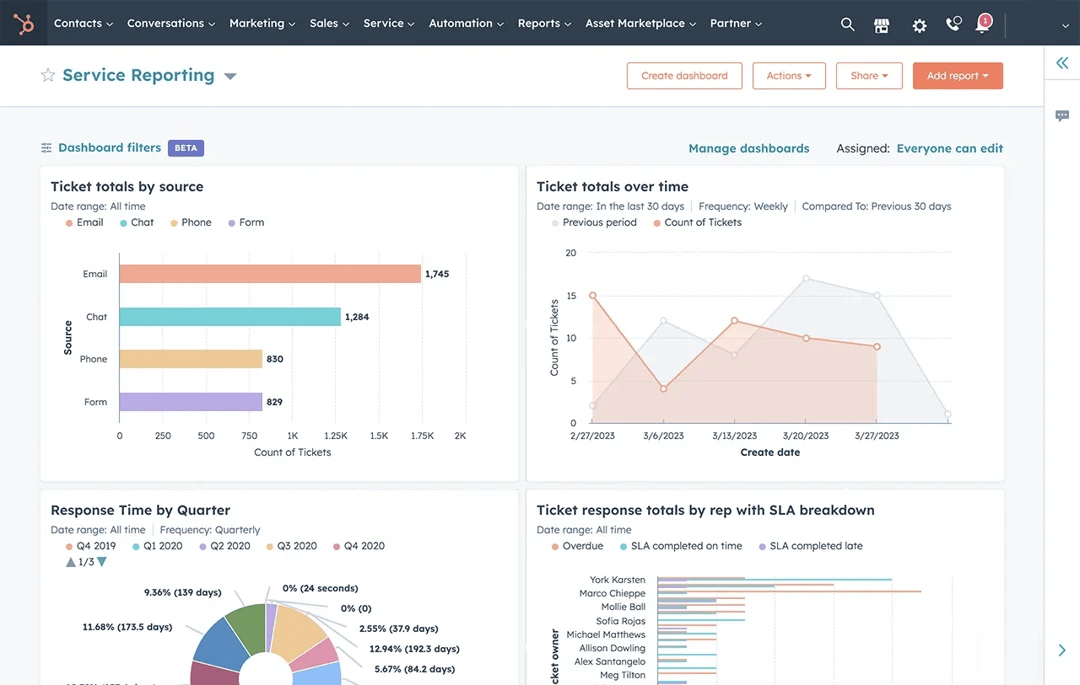
Its dashboards track ticket volume, first-response time, resolution time, agent workload, and customer satisfaction. Managers can see how many tickets are coming in each day and whether the team is keeping up. They can also spot bottlenecks when certain issues take longer than expected.
HubSpot lets users build custom reports with a drag-and-drop builder. This makes reporting accessible to teams that prefer not to work with complex settings. Because all service, sales, and marketing data reside in the same CRM, HubSpot’s reports provide a comprehensive view of the customer lifecycle.
On the other hand, Zoho CRM supports custom dashboards that can combine data from various modules, including sales, support, and external sources.
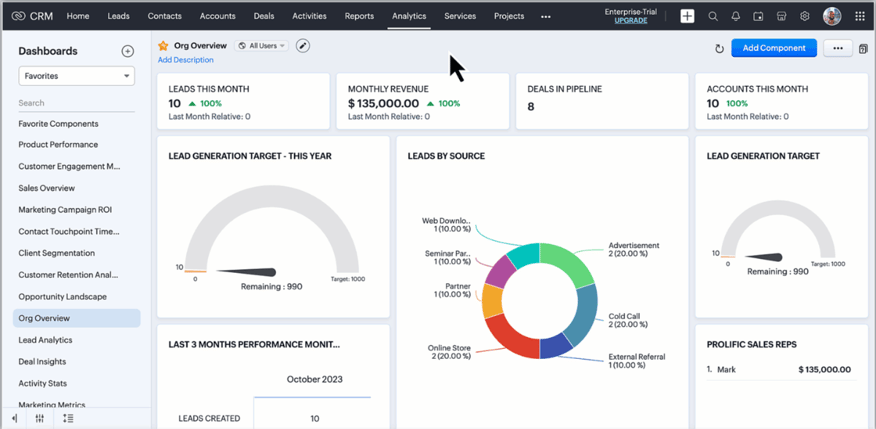
They offer built-in analytics and business intelligence tools that study patterns. Teams can drill into trends across multiple channels, identify sudden changes in performance, or compare activity across different territories.
Zoho’s anomaly detection alerts managers to unusual events, such as a spike in escalations or a sudden drop in agent productivity. The platform supports custom dashboards that can combine data from various modules, including sales, support, and external sources.
Which Is Better? Guide Based on Team Type

Different teams work in different ways. The right platform depends on workflow style, team maturity, and long-term goals.
HubSpot Service Hub works best if your team wants simplicity and speed
Some teams do not have technical people. They do not want to spend weeks building processes. They want something that works right away. HubSpot is built for that type of team. The setup is simple. The interface is clean. The learning curve is short. This helps support teams quickly organize their queues.
HubSpot also works well for teams that work closely with sales and marketing. Because everything lives inside one CRM, teams can align their workflows without moving data between platforms. This is especially helpful for customer success teams that manage renewals or expansions. Service agents can see past deals and marketing interactions. Sales teams can view open tickets before attempting to close new deals. Everyone benefits from shared insights.
If your team wants an all-in-one system that brings the entire customer experience together, HubSpot creates that foundation. It balances structure and flexibility without overwhelming new users. Support teams can build automations, integrate chat tools, and track service performance without requiring a technical administrator. Across industries, 45% of companies report that using a CRM system has directly increased their sales revenue, showing how a centralized platform can benefit not only service but also business growth.
Zoho CRM works best if your team wants deep customization and automation
Zoho CRM supports teams that want full control. This includes businesses with detailed compliance steps, multi-stage service processes, or specific data structures. Zoho lets you customize page layouts, create conditional fields, build custom scripts, and design complex flows. The Blueprint system helps you enforce process rules so every agent follows the same steps.
For automation-heavy teams, Zoho provides strong AI capabilities. Zia can predict behaviors, highlight unusual patterns, and guide agents. Journey orchestration helps teams create automated flows that span multiple touchpoints. Zoho also supports portals that let customers track cases. This reduces manual work for agents.
Zoho works best for teams willing to invest time in setup. Once configured, the system becomes powerful and specific to your workflow.
Let an Expert Help You Decide on a CRM
A modern CRM gives teams a single place to manage contacts, track history, and understand customer behavior. With tools for segmentation, scoring, and activity timelines, support and sales teams get a clearer context behind every interaction.
Multichannel communication, whether via email, phone, chat, or social, can be unified in a single workspace so teams stay aligned no matter where conversations start.
If you want to choose a CRM that is accurate, consistent, and powered by real AI automation, we can help you decide.
Talk to Origin 63 today and start improving how your team understands and manages every customer relationship.







.png?width=90&height=90&name=Arrows%20Partner%20Badge-test%20(1).png)